
Student Loan Payment Estimator Guide

A new graduate opens a first student loan bill and sees a monthly amount that doesn't fit comfortably beside rent, groceries, and a new salary. The immediate question is simple, but the answer depends on more than the balance. Income, family size, tax filing status, loan type, interest, and repayment plan can all change the result.
A student loan payment estimator gives the borrower a starting projection. It doesn't promise an exact bill, and it can't automatically predict every pause, status change, or future income shift. Used carefully, though, it turns an intimidating loan statement into a comparison of real repayment choices.
Table of Contents
- What a Student Loan Payment Estimator Actually Needs From You
- Two Estimates for the Same Borrower
- Why Personal Inputs Change the Monthly Bill
- Running the Federal Repayment Calculator Step by Step
- When an Estimate Quietly Stops Being Accurate
- Connected Accounts Versus Typed-In Numbers
- Turning the Estimate Into a Real Decision
What a Student Loan Payment Estimator Actually Needs From You
A calculator translates loan information into a projected monthly payment. The basic version needs four core inputs, principal, interest rate, repayment term, and repayment plan. More advanced tools add personal information for income-driven estimates.
Consider a fresh graduate with a scenario balance of $30,000 in federal loans and a 6.5% weighted interest rate. The principal is the starting balance. The interest rate determines how quickly interest accrues. The term determines how long repayment lasts. The plan determines the shape of the payment, whether it stays broadly fixed or changes with the borrower's financial circumstances.
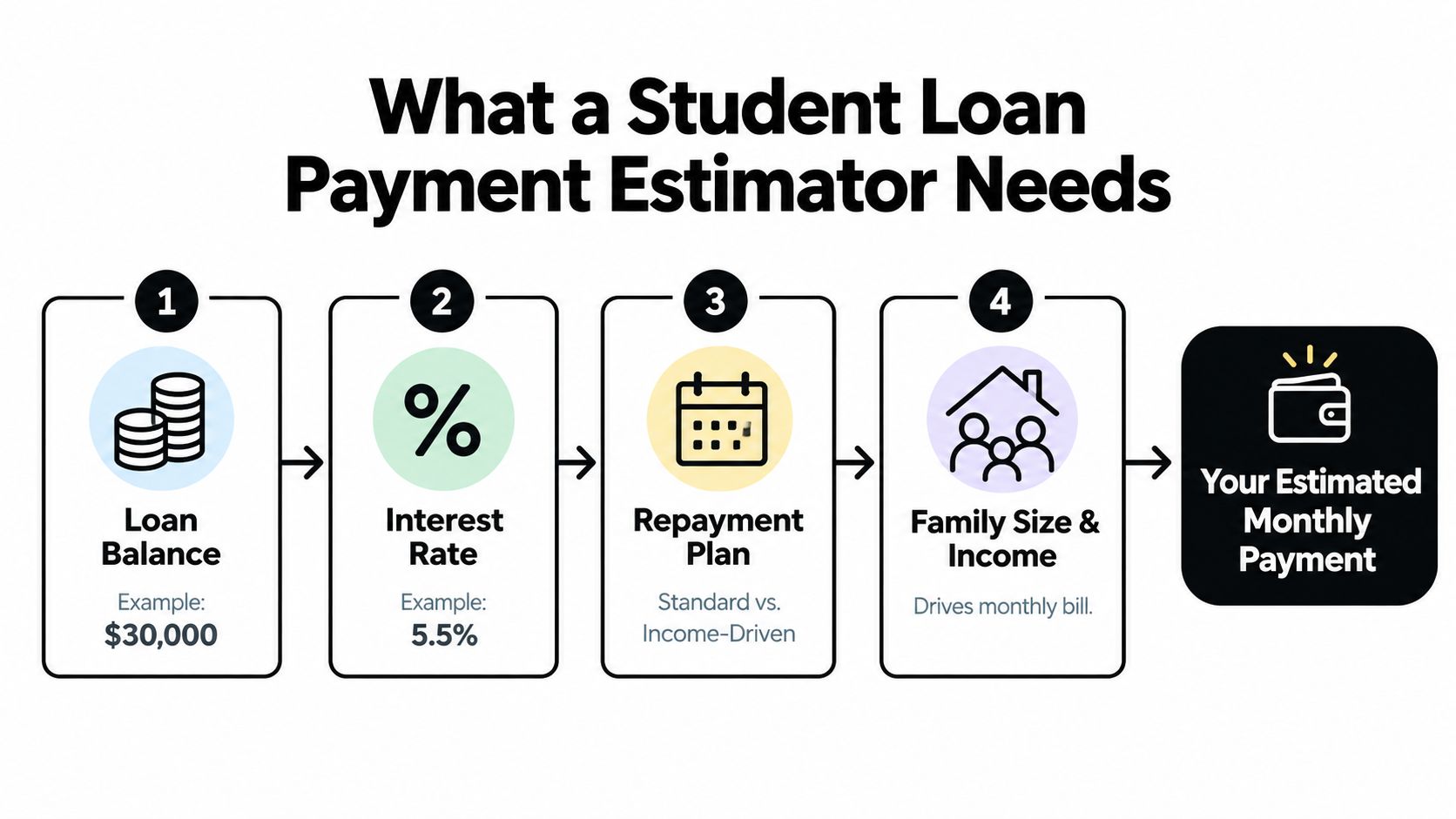
The four inputs in plain language
- Principal: A higher balance generally creates a higher payment or a longer repayment path. The borrower should use the current principal for each loan rather than rely on an old award letter.
- Interest rate: A rate applies to the unpaid balance over time. Multiple loans can have different rates, so a weighted rate is useful for a rough benchmark but may hide important differences.
- Repayment term: A shorter term usually means a higher required payment and less time for interest to accumulate. A longer term can reduce the immediate bill while extending repayment.
- Repayment plan: A standard plan generally uses the loan terms to calculate a fixed payment. An income-driven plan uses financial and household information to determine the required amount.
A quick estimator may need only the loan balance, rate, and term. A federal calculator designed for plan comparisons asks for information such as tax filing status, adjusted gross income, family size, and loan details, and it describes the output as an estimate rather than an exact payment. The Federal Student Aid repayment calculator guide explains why those inputs matter.
The graduate in this example shouldn't stop at one number. The useful question is whether a fixed payment fits the new budget, whether an income-driven plan changes eligibility or cost, and how the total repayment differs under each path.
Practical rule: The first estimate is a benchmark, not a promise from the servicer.
Two Estimates for the Same Borrower
The same $30,000 scenario can produce very different results depending on the selected plan. A standard repayment plan uses the balance, interest rate, and term to create a regular amortization schedule. An income-driven plan recalculates the required bill from the borrower's financial profile and household circumstances.
The comparison below intentionally avoids treating an unverified calculator output as a guaranteed payment. The exact standard amount depends on the actual loan records and rate, while the income-driven result cannot be calculated responsibly without the borrower's qualifying inputs.
Standard versus income-driven repayment
| Input | Standard 10-Year | Income-Driven (PAYE) |
|---|---|---|
| Scenario balance | $30,000 | $30,000 |
| Scenario interest rate | 6.5% | 6.5% |
| Payment basis | Balance, rate, and term | Income, family size, filing status, and eligible loans |
| Monthly payment shape | Generally fixed under the selected term | Recalculated under the plan rules |
| Repayment length | Set by the selected term | May extend beyond the standard term |
| Total amount paid | Calculated from the amortization schedule | Depends on future income, household inputs, payments, and any remaining balance |
| Forgiveness treatment | Not the central feature of the standard schedule | The calculator can show projected forgiveness when the borrower qualifies |
For the graduate, the standard path offers predictability. The required payment doesn't depend on a future pay increase or a change in household size, and the schedule gives a clear payoff target. The tradeoff is that the monthly bill may be harder to manage at the start of a career.
The income-driven path focuses on affordability under the plan's formula. A borrower with modest income or a larger household may receive a lower required payment than the standard schedule would produce. That relief can help protect cash flow, but a lower payment can also mean slower principal reduction, more interest over time, and a possible remaining balance subject to the rules that apply at forgiveness.
The Congressional Research Service overview of federal student loans describes the scale of the underlying repayment challenge. Nearly 43 million people in the United States have federal student loan debt, the federal portfolio exceeds $1.6 trillion, and the Federal Reserve reported that 20% of borrowers were behind on payments or in collections in 2024, compared with 16% in 2023. The median education debt among borrowers with outstanding debt was between $20,000 and $24,999.
The estimator's real value is the side-by-side view. It lets the borrower compare today's affordability with repayment length, projected interest, and possible forgiveness instead of choosing a plan from the monthly number alone.
Why Personal Inputs Change the Monthly Bill
A borrower sees the monthly bill change most clearly with an income-driven repayment plan. Standard amortization relies on the loan terms alone. IDR formulas start somewhere else, with the borrower's financial details.
Adjusted gross income, or AGI, gives the formula its income baseline. Family size affects how much income the plan protects. Tax filing status can change whether a spouse's income is counted under the applicable rules. Each field changes the estimate, so it should be entered with care rather than treated as a formality.
What changes in the estimate
| Variable | Lower Value | Higher Value | Impact on Monthly Payment |
|---|---|---|---|
| AGI | Lower reported income | Higher reported income | Can raise the required IDR payment when the formula applies the higher income |
| Family size | Smaller household | Larger household | Can change the protected income amount and may reduce the calculated payment |
| Tax filing status | Filing status that excludes or limits spouse income under the applicable rules | Filing status that counts more household income | Can change the income used in the calculation |
| Loan information | Fewer or different eligible loans | More loans or different loan types | Can change plan eligibility and the projected payment |
In a hypothetical comparison of an AGI of $40,000 against $55,000, the payment change depends on the plan formula, family size, filing status, and eligible loan types. The rate context behind those figures is covered in our student loan interest rates guide. A calculator should show the result for each complete scenario, not apply a single rule to every borrower.
The federal explanation of income-driven repayment plans says IDR payments are based on income and family size rather than only the loan balance. Federal estimates can also show the projected repayment period, forgiveness, and total interest over the life of the loan.
A tax return from last year may miss a recent job loss, raise, marriage, or household change. A current paystub can flag when the estimate needs a closer review. The servicer still sets the final payment after processing, so accurate personal inputs matter more when the plan depends on your current situation.
Running the Federal Repayment Calculator Step by Step
The federal Repayment Calculator is useful when a borrower wants to compare eligible plans rather than perform only a basic loan calculation. It requests personal and loan information, then presents estimated payment and repayment outcomes for the selected options.
The following walkthrough uses a manual-entry scenario for a borrower with $30,000 in federal loans. The example uses 5.50% in the field-level walkthrough, so it should be treated as a separate illustration from the earlier 6.5% scenario.
Enter the loan information
- Open the Federal Student Aid repayment calculator.
- Choose “Enter Loan Balances Manually” instead of signing in.
- Add the scenario loan balance of $30,000.
- Enter 5.50% for the loan interest rate.
- Leave the field-level interest rate blank when the calculator instructs the borrower to use the general loan information already provided.
- Select Standard and Revised Pay As You Earn from the Compare Repayment Plans dropdown.
- Add AGI, family size, and tax filing status when testing the income-driven option.
The calculator may ask for fields that aren't relevant to every plan. Family size generally doesn't drive a fixed standard amortization estimate, while AGI isn't needed to calculate a standard payment from the loan terms. The borrower shouldn't enter invented values merely to complete a screen.
Read the comparison, not just the payment
The results can display the estimated monthly payment, total interest, repayment length, and forgiveness-related information where the selected plan supports it. A combination may be rejected when the loans aren't eligible, required information is missing, or the chosen plan doesn't apply to the borrower's loan type.
The calculator also has limits. Federal guidance describes its results as estimates, and specialized loan statuses or programs may fall outside the standard assumptions. A borrower should compare the output with the servicer's current account details before submitting a plan request.
A separate student loan debt payoff calculator guide can help borrowers think about payment changes and payoff timing beyond the federal plan comparison.
The video below offers another way to follow the calculator workflow.
The borrower should save or print the comparison, including the assumptions used. A dated copy makes it easier to identify what changed when income, household details, loan status, or plan eligibility changes later.
When an Estimate Quietly Stops Being Accurate
A clean estimate can become misleading after a change in loan status or payment history. The Federal Student Aid calculator warns that some estimates don't apply to loans already paid off or loans in default, cancellation, or discharge status, along with certain specialized federal programs. Other calculators may leave out future fees, capitalization, missed payments, deferment, forbearance, or changing rates.
Events that require a fresh projection
- Deferment or forbearance: A period without a regular payment may allow interest to accrue. The estimate should be treated as a snapshot unless the borrower updates the balance and remaining term.
- Capitalization: Unpaid interest added to principal changes the balance on which future interest accrues. The borrower may need to raise the principal in a new scenario.
- Paused payments: A payment pause can leave the displayed balance and payoff schedule out of step with the borrower's current repayment path. The calculator should be rerun after the account resumes.
- Default: Default changes the repayment context and can make a standard estimate unsuitable. The borrower should resolve the account status and use guidance that matches the available options.
- Income or household changes: An IDR payment can change after recertification or a major life event, so the prior result shouldn't be treated as permanent.
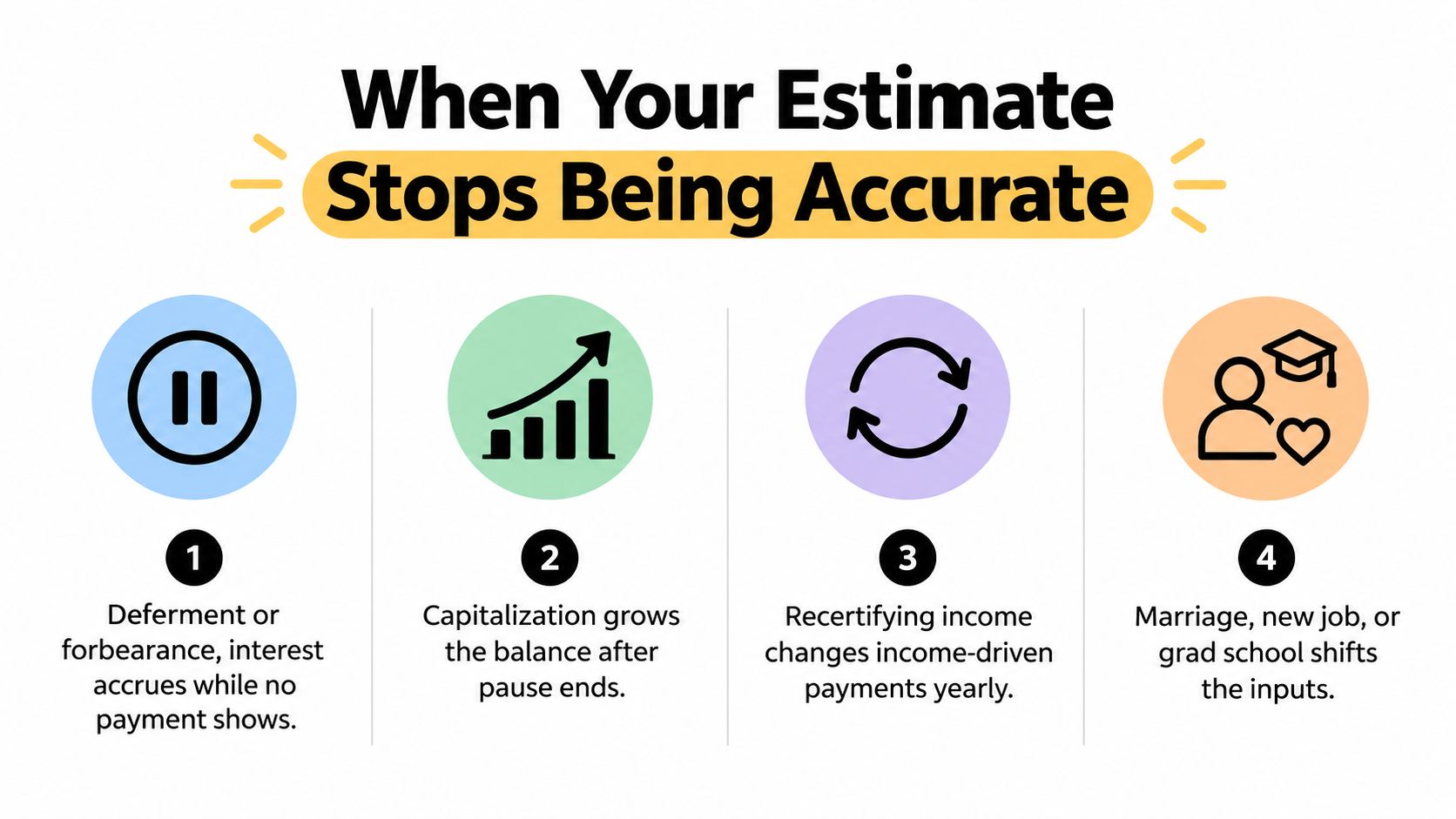
The borrower can adjust the projection by increasing the balance after capitalization, extending the repayment period after a pause, or creating separate scenarios for temporary hardship. A single point estimate can't show every possible future, so a range of outcomes is more honest when the account has unusual history.
Taxable income and estimated tax obligations can also affect the cash available for payments. For a plain-language explanation of estimated tax responsibilities, the Blue Sage Tax guide to estimated taxes provides useful context.
Warning sign: If repayment paused during the last 12 months, the displayed payoff date should be treated as a low estimate until the servicer confirms the current balance and schedule.
Connected Accounts Versus Typed-In Numbers
Manual entry is useful for a first pass, but it depends on memory and careful transcription. A borrower may round a balance, remember an approximate interest rate, or select a plan based on an old enrollment notice. Those shortcuts can make a projection look precise while its starting data remains uncertain.
A connected-account projection can use current information from a servicer account or the National Student Loan Data System when the service supports that connection. Relevant fields may include principal, accrued interest, interest rate, servicer, loan age, loan type, and qualifying payment history. The calculator then runs on the account record rather than on a borrower's recollection.
What improves and what doesn't
Better source data reduces input error, but it doesn't remove every uncertainty. A current balance can still change after servicer processing, and an account connection may not immediately reflect a recent payment, transfer, or status update.
Connected data can make it easier to notice:
- Multiple loan rates: Each loan can be evaluated instead of hiding differences inside one remembered average.
- Plan details: The current plan and loan type can be checked against the borrower's intended comparison.
- Repayment history: Qualifying payment information can support a more realistic forgiveness discussion where applicable.
- Changing income: A projection can be refreshed when recertification or a major income event changes the payment basis.
The tradeoffs deserve equal attention. Account linking creates privacy questions, requires a secure connection process, and may involve delays when a servicer's records lag behind recent activity. A borrower should review permissions, use read-only access when available, and confirm important figures on the official servicer portal.
The account aggregation services guide explains why connected financial data can be useful when several accounts need to be viewed together. Toya AI is one example of a tool that can connect debt accounts, centralize balances, rates, and due dates, and model how payment changes affect payoff timing and total cost.
Turning the Estimate Into a Real Decision
A calculator becomes useful only when the borrower turns its output into an action. The choice between standard and IDR should reflect both present affordability and the long-term cost shown by the comparison.
A practical decision checklist
- Compare the required payments. Place the standard estimate beside the IDR estimate and test whether either payment fits the borrower's actual monthly cash flow.
- Review total cost and repayment length. A lower current bill can extend repayment and increase interest. The calculator's projected interest, payoff period, and forgiveness fields deserve as much attention as the monthly amount.
- Check the account before applying. Verify the current balance, interest rate for each loan, subsidized status, loan type, remaining grace period, and current servicer.
- Assess the forgiveness tradeoff. The borrower should compare the potential value of a lower IDR payment with the uncertainty around future eligibility, remaining balance, and any applicable tax consequences. The useful breakeven point is where the cumulative IDR savings outweigh the added cost and forgiveness-related risk.
- Choose one next step. The borrower can request the selected plan, contact the servicer with specific questions, or correct the account information before making a decision.
A fresh estimate belongs on the calendar after an income change, marriage, job loss, consolidation, or annual IDR recertification. It should also be revisited when the servicer changes, a payment pause ends, or the borrower returns to school.
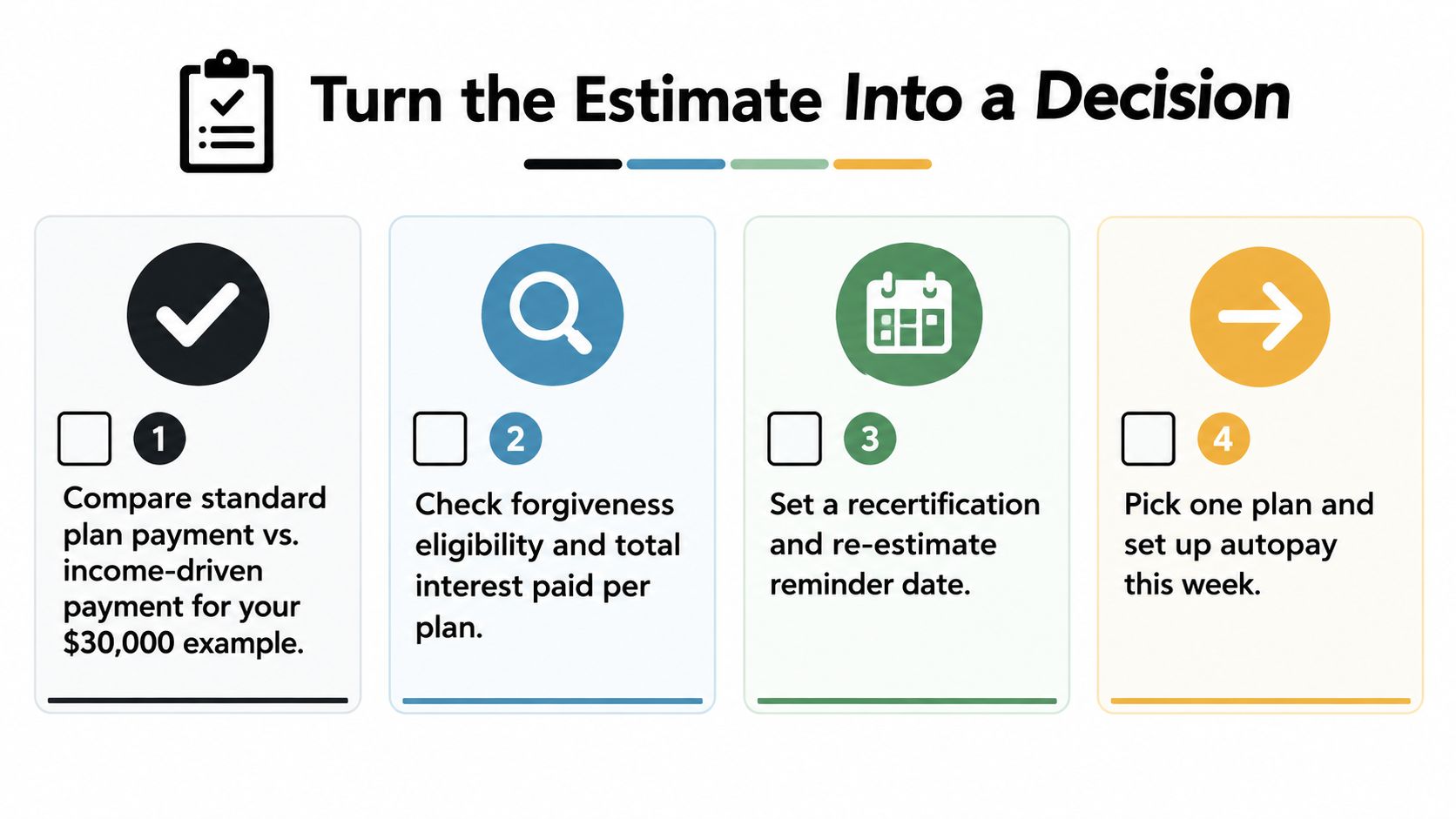
The estimate is the first conversation with the debt, not the last. The servicer's records, the borrower's budget, and the selected plan must agree before the payment becomes a sustainable decision.
Borrowers can use Toya AI to connect eligible debt accounts, organize balances and due dates, and compare how payment changes may affect payoff timing and total cost. A fresh projection gives the borrower a practical starting point before contacting the servicer or choosing a repayment plan.
Ready to start your debt-free journey?
Toya AI builds a personalized payoff plan so you can see your debt-free date and save on interest.
Get Started Free