
Loan Payoff Calculator Multiple Loans That Actually Works

You've got too many due dates open in your head, one card feels urgent, the auto loan keeps pulling cash every month, and the student loan notice just changed the whole picture again. That's exactly where a loan payoff calculator for multiple loans earns its keep, because single-loan thinking breaks the moment your debt stops behaving like a single problem.
A useful payoff plan doesn't ask which account exists in isolation. It asks which payment sequence protects cash flow, cuts interest, and still keeps the next bill from turning into a missed payment.
Table of Contents
- Why One Loan at a Time Is the Wrong Way to Plan
- What Every Multi-Loan Payoff Calculator Needs to Capture
- Building the Inputs and the Basic Amortization
- Modeling Extra Payments and Strategy Choices
- When Pure Interest Savings Is the Wrong Goal
- Turning the Numbers Into a Monthly Habit
- Build It Yourself or Use a Done-For-You Tool
Why One Loan at a Time Is the Wrong Way to Plan
A borrower can clear one credit card and still fall behind overall. The problem is not which balance receives extra money. It is how several balances, payment dates, interest rates, and income changes interact. In Q2 2025, U.S. household debt reached $18.39 trillion, up $185 billion, or 1%, from the prior quarter. Credit-card balances reached $1.21 trillion, while auto-loan balances reached $1.66 trillion New York Fed. Student debt also remained a major form of non-housing consumer borrowing alongside auto and credit-card debt.
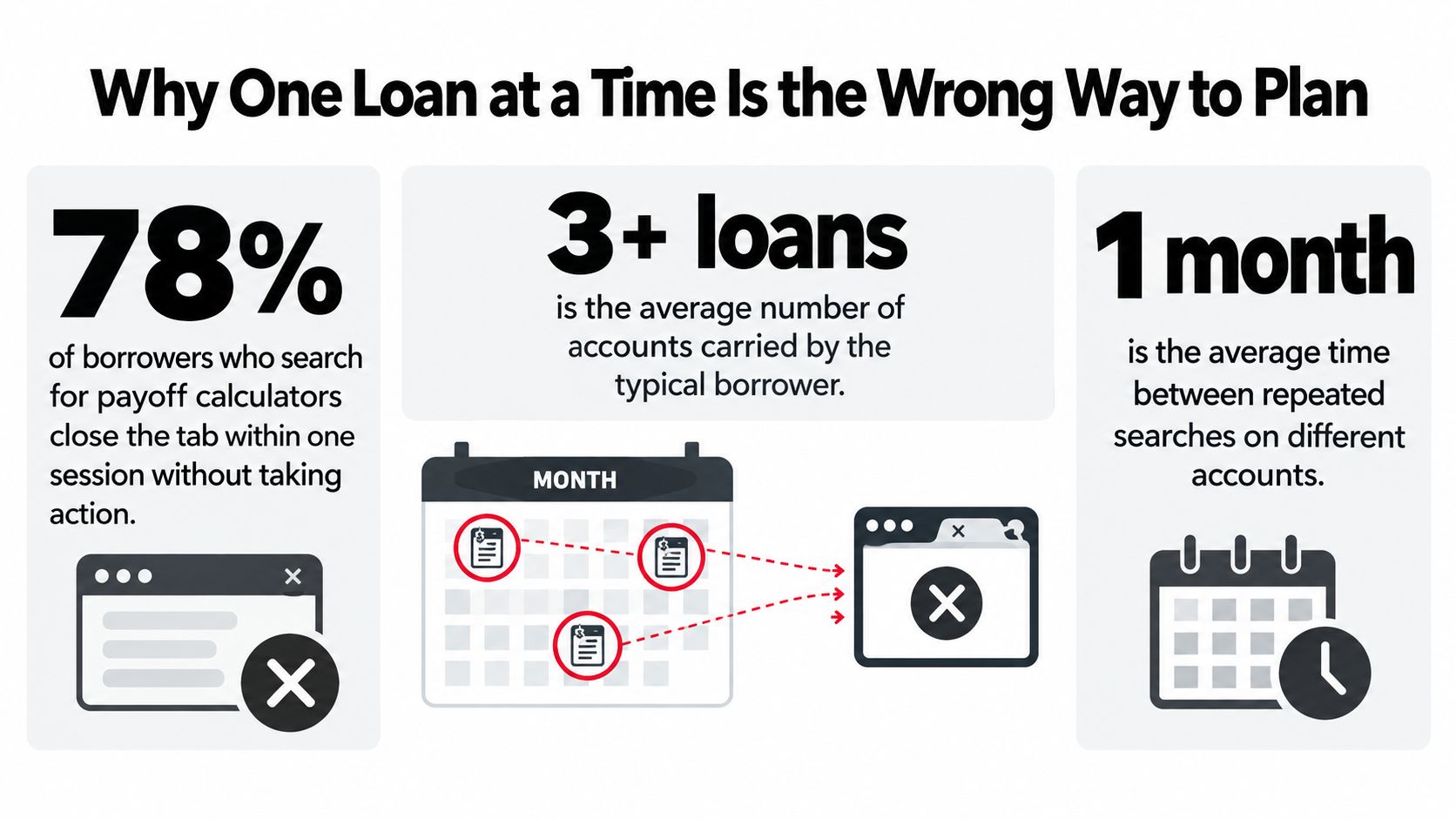
A single dashboard should combine every account before recommending a payoff order. It should display the total monthly obligation, interest across the full debt mix, and the account projected to disappear first. That view exposes a problem a one-loan calculator misses: sending every available dollar to one balance can leave too little cash for another bill due sooner.
What changes when the accounts are combined
A multi-loan calculator turns payoff order into a cash-flow decision, not a permanent avalanche-versus-snowball choice. It can direct extra money toward the highest-cost debt in one month, preserve cash before several autopay dates in another, and change priority when income is irregular or student-loan payments restart.
Practical rule: show the full monthly obligation before assigning extra money. If the tool cannot do that, its recommendation is incomplete.
Start by listing each debt, its payment rules, and the cash available after ordinary bills. Then test whether the proposed order survives real payment timing. A borrower who clears one card while missing a student-loan due date can lose more to penalties and disruption than the avalanche strategy saves.
For a plain-language guide to which debt should I pay off first, use a priority method that protects required payments before optimizing interest.
What Every Multi-Loan Payoff Calculator Needs to Capture
A multi-loan calculator should start with the account details, not a headline payoff date. Without that, the plan can look tidy and still miss a due date, a rate change, or a payment that needs to clear before the next paycheck lands.
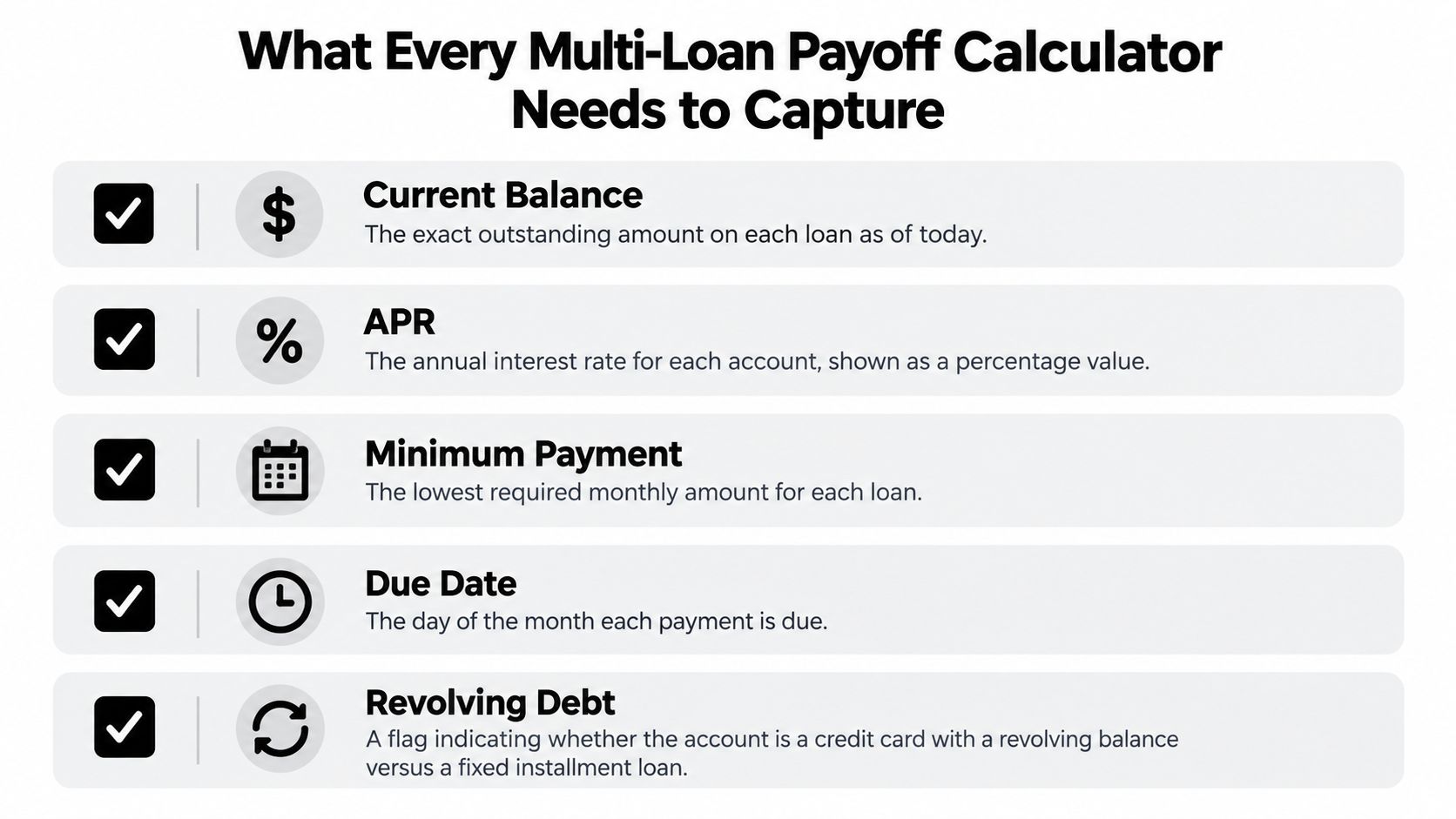
The five fields that matter first
Every account needs its own current balance, APR, minimum payment, due date, and a flag for whether it is revolving or installment debt. Those five inputs set the pace of interest, the size of the required payment, and the timing pressure on cash flow. Miss one field, and the payoff date stops matching real life.
Revolving debt, such as a credit card, does not behave like an auto loan or student loan. Its balance can change from month to month, and the interest math shifts with it. Installment loans follow a fixed path, so the calculator needs different logic for each type. If it treats both the same way, the recommendation may look clean and still be wrong.
The extra fields that separate a toy from a tool
Good calculators also capture promotional 0% APR windows, interest capitalization rules on student loans, and any payment changes after forbearance or deferment. Those details decide whether a balance is manageable or only appears manageable on paper. Borrowers get burned when the model ignores a rule that changes before the payoff date arrives.
For teams that need a broader account picture, account aggregation services show how cleaner data collection can reduce manual entry and keep the payoff plan grounded in current balances.
A fast check keeps the model honest:
- Balance accuracy: each account should match the latest statement.
- Rate accuracy: APR should reflect the current contract terms.
- Payment accuracy: minimums should match the required amount.
- Timing accuracy: due dates should be listed separately.
- Debt type accuracy: revolving and installment debts should stay distinct.
If any of those inputs is stale, the payoff date drifts from reality.
Building the Inputs and the Basic Amortization
The math only works if the inputs are clean. For revolving debt, the monthly interest estimate comes from the balance and APR, while installment loans need an amortization schedule that shows how each payment splits between interest and principal. The formula is less important than the discipline of feeding it the right data.
Here's a simple worked example with three common account types.
| Loan | Balance | APR | Min Payment | Term |
|---|---|---|---|---|
| Credit Card | $7,200 | 24.99% | $180 | Revolving |
| Auto Loan | $14,500 | 7.4% | Fixed | 60 months |
| Student Loan | $22,000 | 6.8% | Fixed | 10 years |
The first mistake people make is acting like the minimum payment is the payoff plan. It isn't. It's the floor, not the strategy. On the card, interest accrues continuously enough that the balance can stay sticky; on the installment loans, the schedule determines how much principal gets knocked down each month.
If a borrower wants to compare the mechanics side by side, the credit card balance needs one treatment, the auto loan another, and the student loan another. That's why some payoff calculators look clean but feel wrong, they skip the difference between daily interest behavior on cards and monthly amortization on installment debt.
A calculator should show the debt path, not just the payment amount. If the balance drops slowly while the interest share stays stubborn, the model is doing the job.
The easiest way to sanity-check a tool is to ask three questions. Does it show the starting balance? Does it show how much of each payment goes to interest versus principal? Does it update the payoff date when the APR changes? If the answer is no, the output is too shallow to trust.
For readers who also juggle property expenses, rental property tax pitfalls to avoid is a helpful reminder that financial models only work when the underlying assumptions are realistic.
Modeling Extra Payments and Strategy Choices
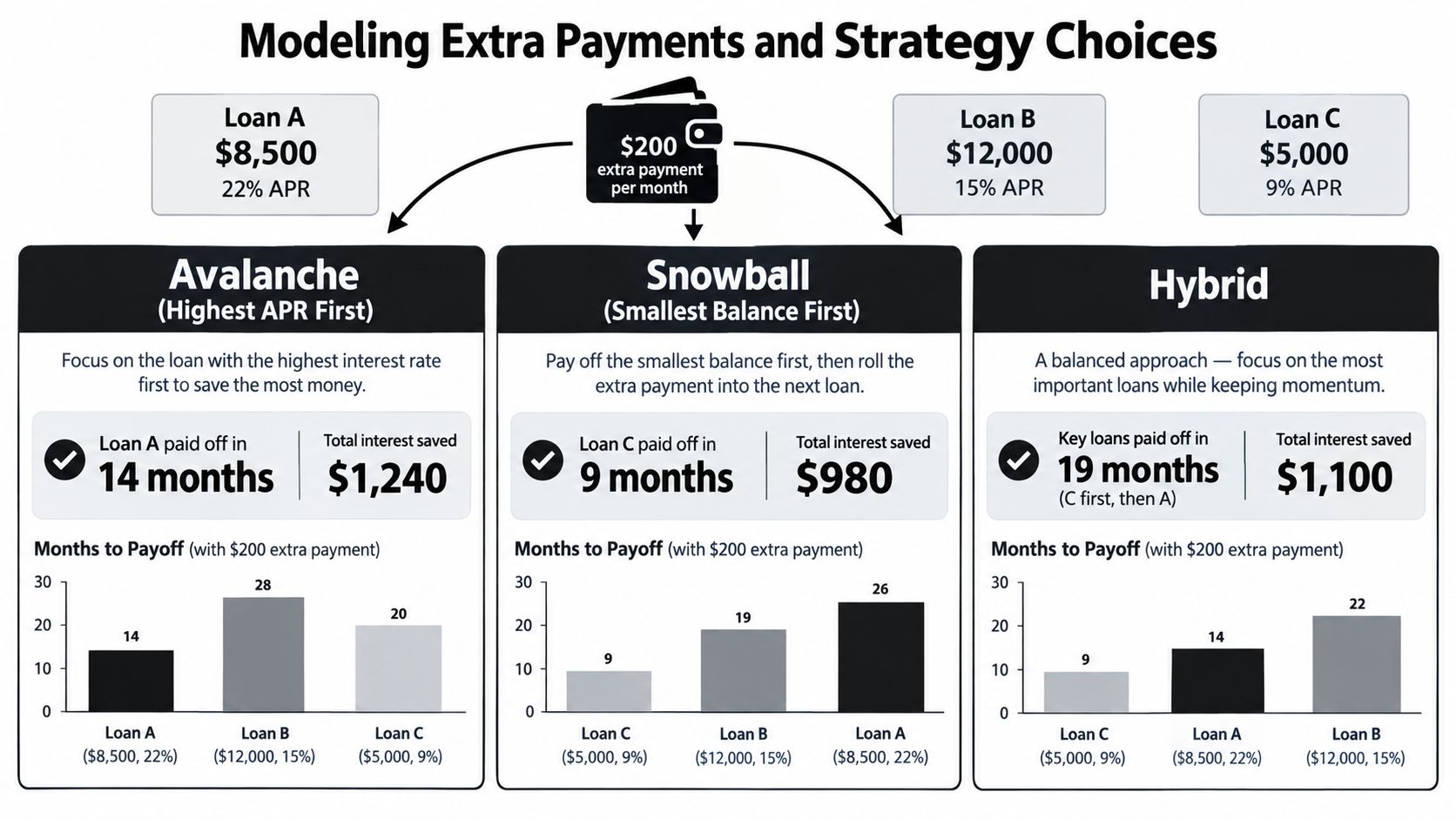
The calculator becomes decision-making software instead of a spreadsheet with a date on it. The same extra cash can produce very different outcomes depending on whether it goes to the highest APR first, the smallest balance first, or a split approach. The right choice is usually the one that fits both the math and the borrower's monthly cash flow.
What an extra payment should change
Using the same three-loan setup, imagine an extra $200 a month. Under a pure avalanche approach, the highest-rate balance gets the extra cash first. Under a snowball approach, the smallest balance gets the push. A hybrid splits the difference and is often easier to live with when cash flow is uneven.
The useful part is not the label. It's the change in payoff behavior. The calculator should show which account closes first, how the remaining payments roll forward, and how the total interest shifts when extra money lands on a different loan.
Why irregular cash needs scenario modeling
A tax refund, a raise that frees up another $150 a month, or a 0% promotional rate ending in 14 months can all change the answer. A static calculator that ignores those events will give a false sense of precision. An adaptive calculator should let the user test each event before committing to a sequence.
The same logic applies to tools that let borrowers direct extra principal payments. A good walkthrough of that mechanic appears in extra principal payments, especially for people trying to decide whether one lump sum or many smaller ones does more damage to the balance.
The best payoff plan is rarely the one that feels neat on paper. It's the one that still works after a surprise bill, a delayed paycheck, or a rate change.
A simple rule helps here. Run at least three scenarios, one that maximizes interest savings, one that gets to debt-free fastest, and one that preserves enough monthly breathing room to avoid new borrowing. That's the core use case for a multi-loan payoff calculator.
When Pure Interest Savings Is the Wrong Goal
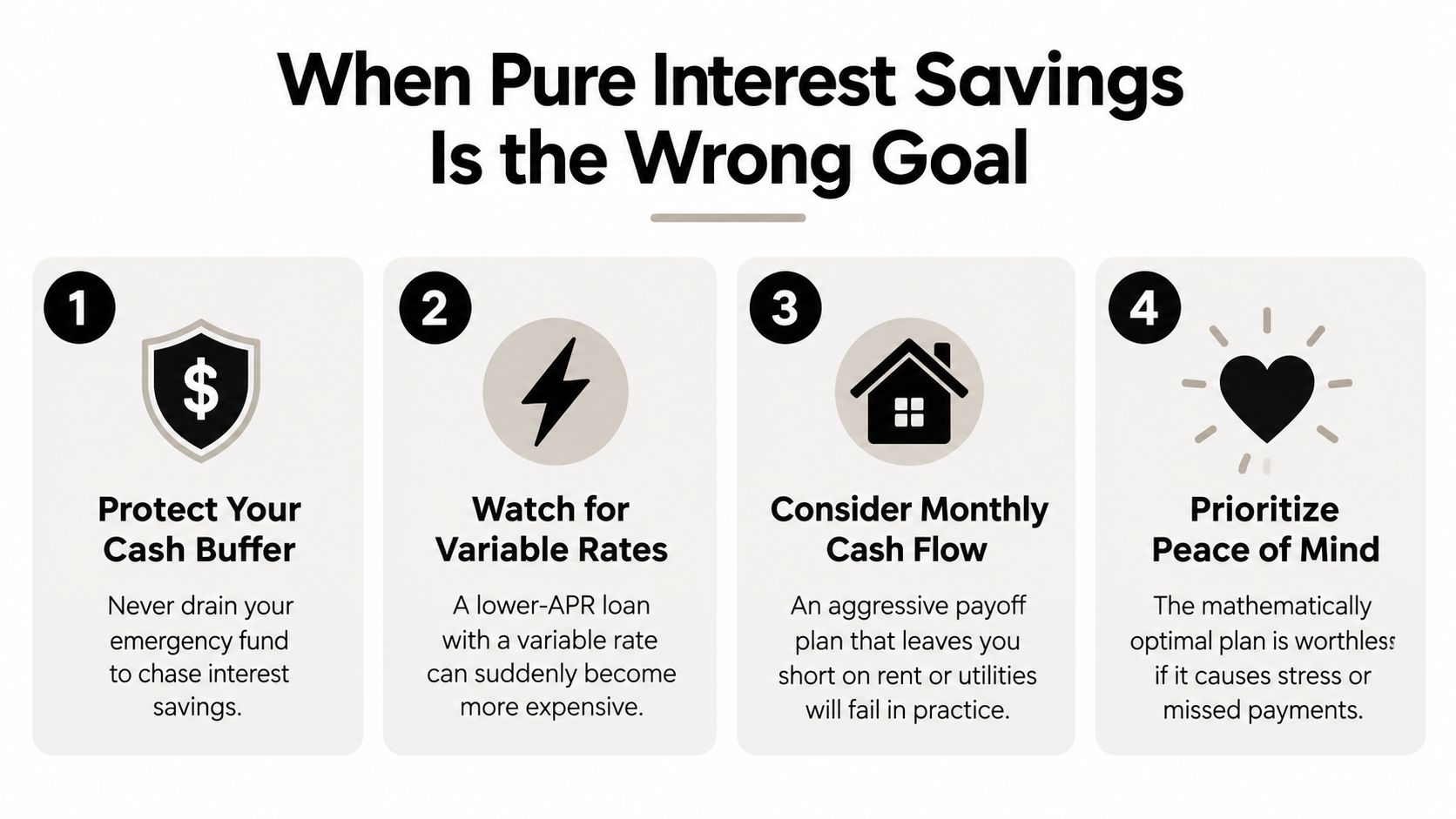
A payoff order can look perfect on paper and still fail in real life. If extra payments leave the account too thin before payday, one car repair or utility bill can push a new balance back onto a card. A plan that forces new borrowing to survive the month cancels out its own interest savings.
The resilience layer matters
A serious calculator needs three checks before it approves aggressive extra payments. Every minimum payment has to stay covered. The next 14 days of cash flow need room for normal spending. Emergency savings also needs a floor before any optional extra payment goes out.
Student loans make this even more important. In June 2025, Federal Student Aid reported that more than 65% of Education Department-serviced borrowers in active repayment were current or less than 31 days delinquent Federal Student Aid. That means a meaningful share of borrowers were already close to the edge. The key question is not only which debt carries the higher rate. It is which debt creates the fastest consequence if you miss it.
When urgency beats APR
A delinquent student loan can move ahead of a credit card with a higher APR. A required payment change after forbearance can also jump the queue, because the next bill may not match the last one. Pure interest savings ignores those timing shocks.
Spending cuts around student debt can also squeeze the budget. A 2025 Investopedia analysis found that the typical borrower reduced weekly spending by an estimated $12.20 for every $10,000 of student debt after payments resumed. That kind of pressure can change how much extra payment is safe, even if the spreadsheet says more is available.
Pure rate savings is the wrong target if it leaves the borrower one surprise away from new debt. A better payoff order protects the next paycheck first, then attacks the costliest balance.
Turning the Numbers Into a Monthly Habit
A payoff plan only works if it gets updated. Balances change, APRs move, income shifts, and one new charge can upset the order. A dead-reckoning plan is how borrowers end up trusting a stale timeline.
The 15-minute review that keeps the plan honest
Once a month, open the dashboard and verify each balance and APR. Log any new charges, closed accounts, or balances that were paid down faster than expected. Then rerun the top two scenarios with the updated numbers and compare the payoff date, not just the monthly payment.
That review does not need to become a ritual for its own sake. If nothing changed and the plan is still on track, rerunning every scenario is busywork. The point is to catch real movement, not create more screen time.
For borrowers who stall when it's time to act, financial discipline support for procrastinators is a useful example of how outside accountability can keep a payoff plan from drifting.
What should trigger an unscheduled update
A new debt account should trigger a fresh run. So should a changed minimum payment, a new autopay date, a raise, a pay cut, or a student-loan status change. The calculator is most valuable when it reacts to those events quickly instead of waiting for the next monthly review.
A payoff dashboard should be treated like a navigation tool. If the road changes, the route gets recalculated.
That habit also helps the borrower spot when the plan is becoming too aggressive. If the review shows cash getting tight, the strategy should be softened before the borrower starts borrowing again to fund the payoff itself. That's the difference between progress and performance.
Build It Yourself or Use a Done-For-You Tool
A spreadsheet gives full control, but it also asks the borrower to maintain every assumption by hand. That works for people who like formulas and trust their own discipline. It breaks down when account data changes often or when the borrower doesn't want to rebuild schedules every time a balance moves.
How to judge the trade-off
A done-for-you tool is the better fit when the plan needs to stay current without constant manual work. Toya AI is one option in that category, because it connects multiple debt accounts into one dashboard, tracks balances, APRs, and due dates, and shows how payment allocation changes the projected debt-free date and interest cost.
A practical evaluation rubric helps more than a giant shortlist:
- Data freshness: does it pull current balances and due dates without manual re-entry?
- Scenario depth: can it test extra payments and changing priorities?
- Debt coverage: does it handle credit cards, student loans, auto loans, and personal loans together?
- Cash-flow awareness: does it protect minimums and timing, not just interest?
- Ease of review: can the borrower update the plan in minutes, not hours?
The spreadsheet route wins on transparency. The tool route wins on maintenance. The right choice depends on whether the borrower wants to manage the math or manage the result.
For readers comparing software workflows, compare Excel workflow solutions gives a useful frame for that build-versus-buy decision.
This week's next moves are straightforward. Gather every loan statement, write down the balance, APR, minimum payment, and due date, then run three payoff scenarios, interest-heavy, fast-free, and cash-flow-safe. The best plan is the one that survives ordinary life, not the one that looks clever in a screenshot.
If the debt picture keeps changing every month, Toya AI can turn that mess into a living payoff plan instead of a static worksheet. Visit Toya AI to see how a multi-loan calculator can track balances, prioritize payments, and keep the timeline tied to real cash flow.
Ready to start your debt-free journey?
Toya AI builds a personalized payoff plan so you can see your debt-free date and save on interest.
Get Started Free