
How to Work Out Student Loan Repayments: A Worked Example

The loan statement shows a payment due, but rent, groceries and an uneven paycheck make that number harder to interpret. A calculator can estimate what clears the debt on schedule. It can't decide whether that payment still works when overtime disappears or an unexpected bill arrives.
Learning how to work out student loan repayments means answering two questions: what does the loan require, and what can the borrower reliably afford? A useful calculation puts the monthly payment, total interest and bad-month budget next to each other.
Table of Contents
- Gather the Inputs Every Repayment Calculation Needs
- How to Calculate a Standard Monthly Payment in Five Steps
- Compare Payments Across Balances, Rates and Terms
- How Unpaid Interest Changes the Balance You Repay
- Estimate an Income-Driven Payment Step by Step
- Model Extra Payments and Uneven Income Months
- Confirm Your Numbers Before You Choose a Plan
Gather the Inputs Every Repayment Calculation Needs
A repayment calculator is only as good as the numbers entered into it. An original borrowing amount isn't necessarily the current principal, and the account's total balance may include unpaid interest that needs separate treatment.
For each loan, the borrower needs the following information.
Inputs for a repayment calculation and where to find them
| Input | Where to find it | Why it matters |
|---|---|---|
| Current principal | Servicer dashboard or StudentAid.gov, principal balance line | Drives every payment formula |
| Interest rate (APR) | Loan detail page, one rate per loan | Each loan can carry a different rate |
| Remaining term | Repayment schedule for the chosen plan | Sets the number of monthly payments |
| Accrued or unpaid interest | Account statement, accrued interest line | Can capitalize and raise the balance |
| Plan type and status | Plan selection or forbearance notice | Decides whether the payment is fixed or income-based |
The principal identifies the amount on which interest is calculated. The annual rate determines the interest charge, while the remaining term determines how quickly the borrower must repay principal.
According to Federal Student Aid's Standard Repayment Plan guide, payments are fixed and generally scheduled for up to 10 years, while consolidation loans can have terms ranging from 10 to 30 years depending on the balance. A borrower should therefore use the actual repayment schedule rather than assume that every loan has the same payoff deadline.
Keep separate loans separate
Several loans can appear under the same account without sharing an interest rate or repayment schedule. Combining their balances and using an unweighted average rate can produce a misleading estimate.
- Create a row per loan. Record each loan's principal, rate, term, unpaid interest and status.
- Check the statement date. A dashboard balance and an older statement may describe different points in time.
- Calculate before combining. Add the individual payment estimates only after calculating each loan separately.
The explanation of student loan interest rates can help distinguish the annual rate from the interest charged during a payment period. Before running any numbers, the borrower should check every spreadsheet entry against the latest statement, including notices about deferment or forbearance.
How to Calculate a Standard Monthly Payment in Five Steps
Consider a hypothetical loan with $30,000 in principal, a 6.5% annual rate and a 10-year repayment term. The calculation assumes a fixed rate, equal monthly payments and no unpaid interest added to the starting principal.
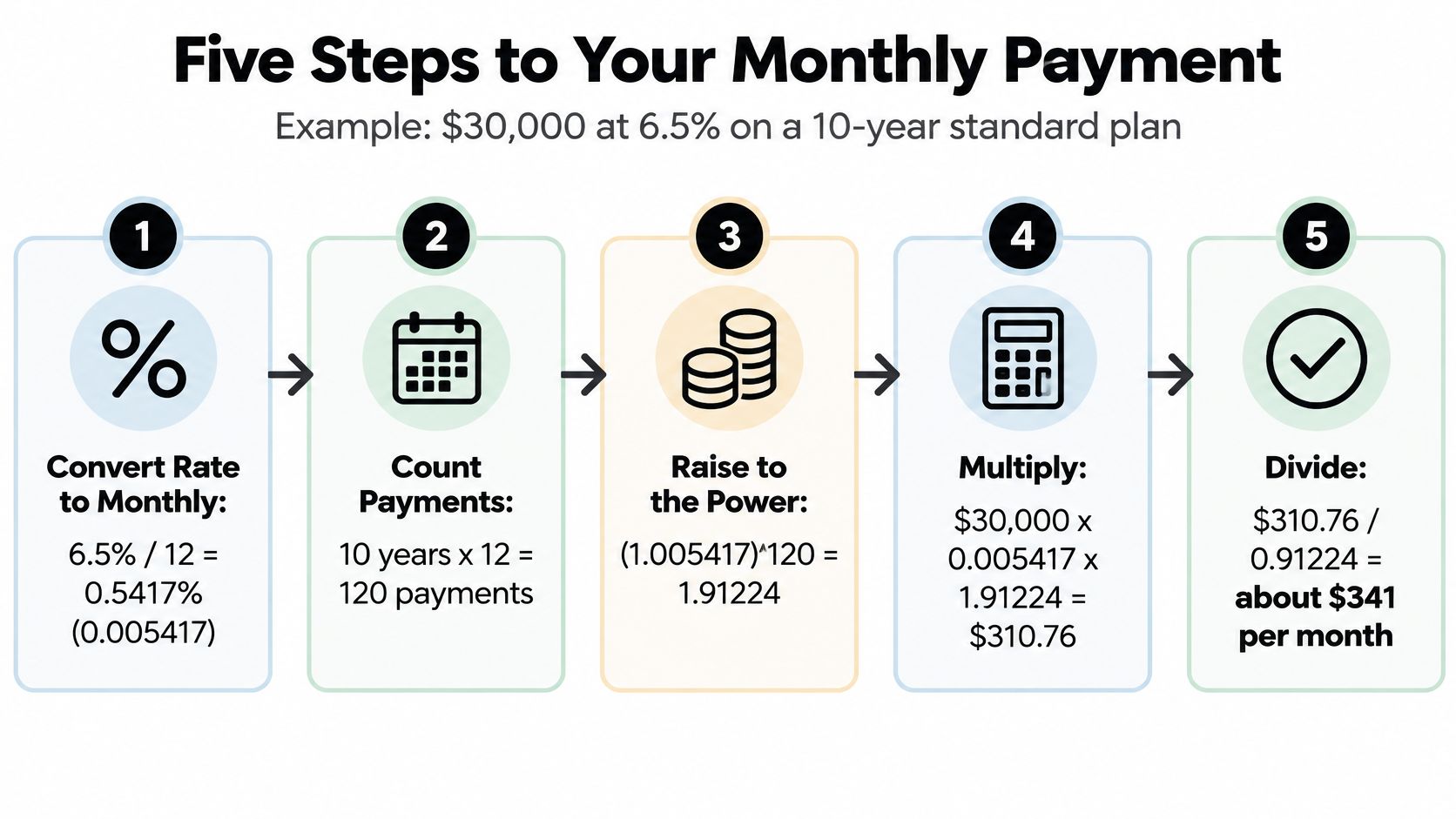
The infographic illustrates the calculation process.
Work through the arithmetic
Convert the annual rate into a monthly rate. Dividing 6.5% by 12 gives approximately 0.5417%, or 0.005417 as a decimal, because the formula matches the rate to the monthly payment period. Keeping the full value of
0.065/12in the calculator avoids unnecessary rounding.Count the payments. Multiplying 10 years by 12 gives 120 monthly payments, which sets the time available to clear the balance. A borrower already partway through repayment should enter the remaining payment count instead.
Apply the amortization formula. Use
M = P × r ÷ [1 − (1 + r)^−n], wherePis principal,ris the monthly decimal rate andnis the payment count. With these hypothetical inputs, the numerator is $162.50 and the denominator is approximately 0.4771, producing a payment of about $341 a month.Check the lifetime cost. Using the unrounded monthly result of approximately $340.64 gives about $40,877 in total payments and $10,877 in interest. Using the rounded $341 payment instead gives $40,920, so retaining cents matters when comparing totals.
Compare the estimate with the servicer's quote. Small differences can reflect rounding, daily interest calculations or accrued interest, but a substantial difference needs investigation. Federal Standard payments also have a minimum, so the formula alone doesn't determine every small-balance bill.
Check with a spreadsheet
Excel or Google Sheets can perform the same calculation:
=PMT(0.065/12,120,-30000)
For this hypothetical example, the result is approximately $340.64. The negative principal tells the spreadsheet to display the payment as a positive outgoing amount.
A reusable calculation line is:
Monthly payment = current principal × monthly rate ÷ [1 − (1 + monthly rate) raised to the negative payment count].
After completing the hand calculation, the borrower should run identical inputs through a loan calculator and compare results. If the difference exceeds rounding, the first checks are the rate format, the remaining term and the treatment of unpaid interest.
The video offers another way to follow the repayment arithmetic.
Compare Payments Across Balances, Rates and Terms
For the hypothetical $30,000 loan at 6.5%, extending repayment from 10 to 20 years lowers the monthly payment from about $341 to $224. But calculated lifetime interest rises from about $10,877 to $23,681, more than double.
Extending the same hypothetical loan to 30 years lowers the payment to about $190, while total interest reaches about $38,263. That's a cash-flow trade-off, not a discount.
Monthly payment and total interest by balance, rate and term
The following are hypothetical amortization calculations, rounded to the nearest dollar. They assume fixed rates, equal monthly payments and no extra payments or added unpaid interest; the terms illustrate costs rather than establish eligibility for a federal plan.
| Balance | Term | Annual rate | Monthly payment | Total interest |
|---|---|---|---|---|
| $10,000 | 10 years | 6% | $111 | $3,322 |
| $15,000 | 10 years | 6.5% | $170 | $5,439 |
| $30,000 | 10 years | 6.5% | $341 | $10,877 |
| $30,000 | 20 years | 6.5% | $224 | $23,681 |
| $30,000 | 30 years | 6.5% | $190 | $38,263 |
| $50,000 | 10 years | 4.5% | $518 | $12,183 |
| $50,000 | 20 years | 4.5% | $316 | $25,918 |
| $50,000 | 10 years | 6.5% | $568 | $18,129 |
Read across before choosing
Each row answers a complete question: what payment clears this balance, at this rate, over this term? Comparing monthly payments without also comparing interest leaves out much of the decision.
The hypothetical $50,000 rows help separate rate effects from term effects. At the same repayment term, the lower rate reduces both the payment and total interest; stretching the lower-rate loan over a longer period produces a larger interest increase than the rate difference in these examples.
Choose the shortest available term that remains affordable in a weak month, rather than automatically choosing the lowest payment.
A borrower can also use the table to check a quote. For example, a hypothetical $280 quote for the $30,000 balance at 6.5% falls between the shorter- and longer-term payments shown, so the borrower should ask which payoff term the servicer used.
The table isn't a substitute for a repayment schedule. It's a way to spot whether the quoted payment matches the intended payoff deadline before committing to it.
How Unpaid Interest Changes the Balance You Repay
Consider a hypothetical $10,000 loan at 6% annual interest. Using a simple monthly approximation, it accrues about $50 a month, or roughly $300 during six months without payments; if that amount capitalizes, principal becomes $10,300.
Under a hypothetical fresh 10-year amortization schedule, that change raises the calculated monthly payment from about $111 to $114. The payment increase looks small, but the borrower now pays future interest on a larger principal.
Accrued interest is interest already charged but not yet paid. Capitalized interest is unpaid interest added to principal, making it part of the balance used to calculate future interest.
The image reflects the statement review needed before entering a balance into a calculator.

Identify the capitalization event
Federal Student Aid's exit-counseling guide gives an example in which a six-month deferment produces $340 of unpaid interest, which increases principal if it capitalizes. That example shouldn't be substituted for a borrower's actual accrued-interest figure.
The Consumer Financial Protection Bureau illustrates a $5,000 loan at 10% accumulating $500 of in-school interest and $250 during a six-month grace period, creating a capitalized principal balance of $5,750; it also identifies capitalization situations including the end of an unsubsidized federal-loan deferment, leaving IBR or no longer qualifying under its rules.
Before recalculating, the borrower should:
- Request the event date. Ask the servicer whether capitalization applies and when it would occur.
- Separate the balances. Record principal, accrued interest and any interest already capitalized.
- Consider an interest payment. If affordable, paying accrued interest before capitalization prevents that amount from becoming additional principal.
A calculator should include capitalized interest in principal only once. Adding it again to a balance that already includes it overstates the debt and the estimated payment.
Estimate an Income-Driven Payment Step by Step
A lower first bill can leave more room in a tight month, but it may also mean a longer repayment period and a higher total cost. Compare the required payment with what you could still manage during a difficult month, then estimate the cost across the plan's full term.
| Plan | How the payment is set | Typical term | What to check |
|---|---|---|---|
| Standard | Fixed amount that clears the balance | Up to 10 years | Lowest total interest among these conventional full-repayment schedules |
| Graduated | Starts low and rises about every two years | Up to 10 years, longer for some consolidation loans | Higher total interest than Standard |
| IBR, qualifying new borrowers | 10% of discretionary income, capped at the 10-year Standard amount | 20 years | Recertify income and family size |
| IBR, other borrowers | 15% of discretionary income, capped at the 10-year Standard amount | 25 years | Confirm eligibility and certification dates |
Federal Student Aid's repayment-plan guide describes Standard repayment within 10 years, Graduated payments that generally increase every two years, and IBR payments set at 10% or 15% of discretionary income for qualifying borrowers, capped at the 10-year Standard amount. Under IBR, repayment can last up to 20 or 25 years, depending on the borrower's category.
These are plan structures, not a guarantee that every plan is available to every borrower. Confirm eligibility and current rules before treating an estimate as a bill.
Calculate discretionary income first
IBR applies its percentage to discretionary income, not directly to take-home pay. Work through the calculation in order:
- Find adjusted gross income (AGI). Use AGI from the latest tax return, not salary before deductions or the amount deposited into a bank account.
- Subtract the income protection. For an IBR estimate, subtract 150% of the applicable federal poverty guideline for the borrower's family size from annual AGI. Check the current guideline and how household size is treated in the official application.
- Convert the remainder to a monthly amount. Divide annual discretionary income by 12.
- Apply the IBR rate. For example, $1,000 in monthly discretionary income multiplied by 10% gives an estimated payment of $100 a month for a qualifying new borrower.
- Check the Standard cap. Compare that result with the applicable 10-year Standard payment. If the income-based amount is higher, the cap limits the IBR payment.

Compare projected cost, not just the opening payment
Income, family circumstances, and required payments can change over time. Multiplying the first monthly payment by the full repayment term can therefore give a misleading total.
Build a year-by-year estimate if those inputs may change, and compare the projected payments with the amount your budget could cover in a bad month. Any remaining eligible balance may be forgiven under the plan's rules, so include that possibility when comparing total cost. Borrowers should recertify income and family size each year and confirm the actual deadline with their servicer.
Use this guide to choosing a student loan repayment plan to compare options. Focus on both the projected payment path and the total cost, not only the opening bill.
Model Extra Payments and Uneven Income Months
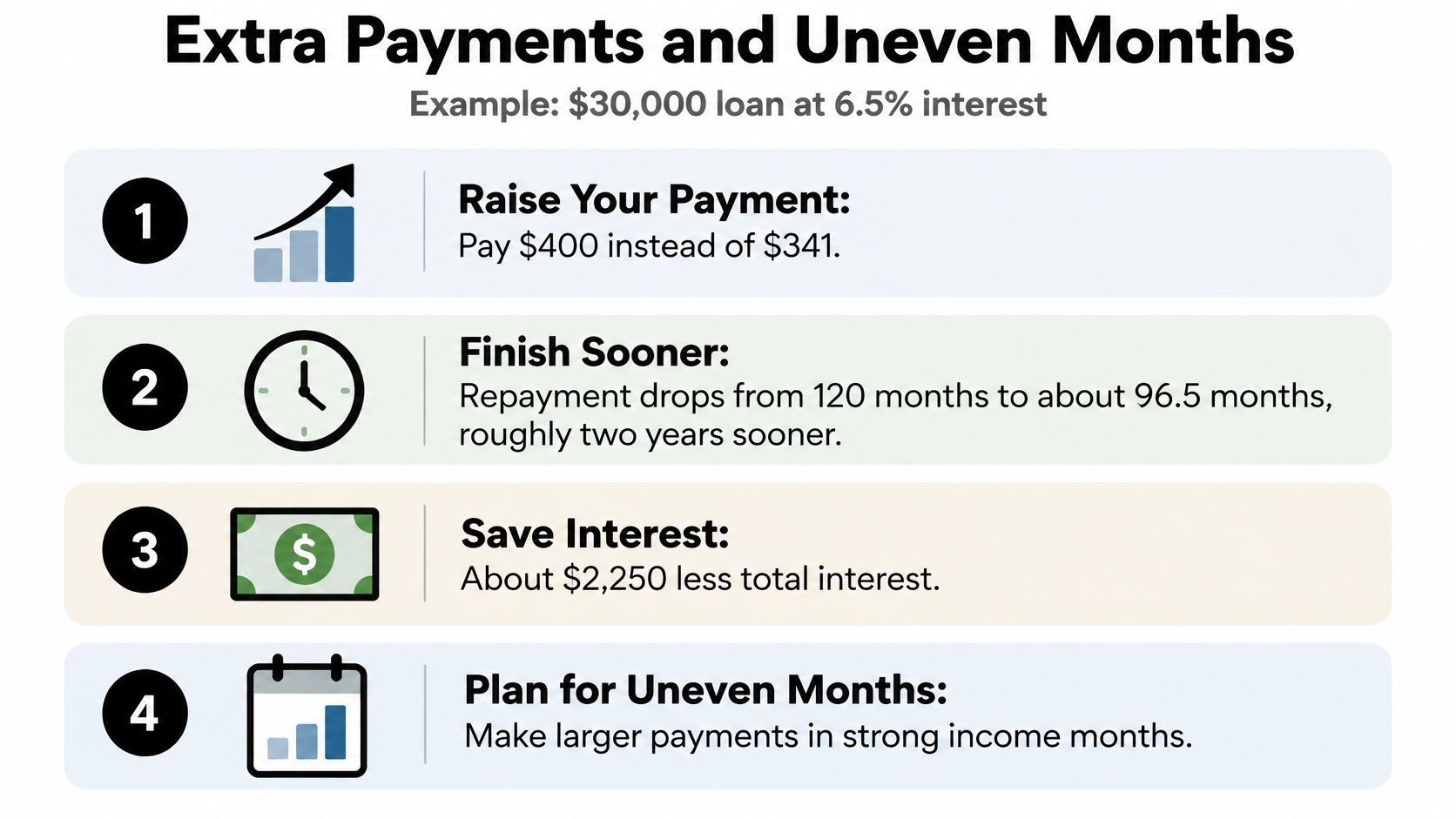
In the hypothetical $30,000 loan scenario at 6.5%, paying $400 rather than the approximately $341 scheduled amount reduces the calculated payoff period from 120 months to about 96.5 months. Under equal-monthly-period assumptions, that saves roughly $2,300 in interest and finishes repayment about two years sooner.
The extra money must reduce the loan balance in practice, after applicable interest and other amounts due are satisfied. The borrower should give allocation instructions where available, then inspect the next statement rather than assume an advanced due date proves the intended principal reduction occurred.
The infographic summarizes the accelerated-payment example.
Separate the required payment from the reliable payment
Pew's fact sheet on new student-loan borrowers found that 56% experienced month-to-month income variation, while 57% of borrowers making payments found them difficult to afford. An annual income figure alone doesn't show whether cash arrives before the bill is due.
The formula payment is what the repayment schedule requires. The cash-flow baseline is what remains reliably available after essential spending and a buffer for irregular expenses.
A personal budget doesn't change the contractual payment. If the reliable baseline falls below the bill, the borrower needs an approved repayment adjustment, not an informal underpayment.
For someone managing credit card balances as well, a large student-loan overpayment may be counterproductive if it forces routine expenses back onto a higher-rate card. Extra payments should come from genuine surplus rather than money already needed elsewhere.
Build a baseline-plus-surplus model
A practical spreadsheet separates required payments from optional acceleration.
- Model the weak month. Use reduced earnings and realistic essential expenses, not the average of unusually strong months.
- Protect a cash buffer. Include irregular costs such as repairs, medical bills and annual renewals.
- Allocate strong-month surplus. Send affordable extra payments after near-term obligations are covered.
- Recalculate after changes. A new work schedule, childcare cost or housing payment can alter the sustainable amount.
The borrower should compare the scheduled-payment path with the accelerated path, including monthly cash remaining, projected payoff date and total interest. The student loan payoff strategies guide offers additional ways to organize payment priorities.
Missed or partial payments shouldn't be modeled as free breathing room. They can leave interest unpaid and trigger repayment consequences, so a cash shortfall calls for contact with the servicer before the due date.
Confirm Your Numbers Before You Choose a Plan
Current plan availability must be checked on StudentAid.gov or with the servicer before relying on an income-driven estimate. Changes since 2025 mean that an older calculator result or saved repayment comparison may no longer describe an available option.
The Federal Register notice documents a February 2025 injunction blocking the entire 2023 IDR rule and subsequent removal of SAVE from the IDR request process; it also records that interest for SAVE-related forbearance was scheduled to resume on August 1, 2025. Those developments illustrate why borrowers must check their actual status rather than treat an administrative pause as permanently interest-free.
Compare available paths separately
For each loan, a borrower should compare the following scenarios using current account information.
| Scenario | Monthly cash-flow question | Cost and eligibility checks |
|---|---|---|
| Remain in the current status | Is a payment due, and is interest accruing? | Balance growth and whether the period counts toward forgiveness |
| Move to an available income-driven plan | What payment follows from current income and family information? | Projected interest, forgiveness conditions and qualifying-payment treatment |
| Use the applicable Standard plan | Can the fixed payment fit the weak-month budget? | Full-repayment cost and any effect on forgiveness eligibility |
Total interest and qualifying-payment consequences belong in separate columns. A lower projected interest bill doesn't establish whether a payment period counts toward forgiveness or Public Service Loan Forgiveness.
The borrower should also request confirmation of which payment history remains credited after a switch. A payoff calculator can estimate amortization, but it can't independently certify federal program eligibility.
Check projections against account records
Excel, official repayment tools and Toya AI can support different parts of the comparison; the latter can use balances, rates and due dates to project payoff timing and show how extra payments change total cost. Product projections should still be checked against the servicer's schedule and applicable plan rules.
The action for this week is concrete: list each loan, run the available scenarios and reconcile the inputs with the latest statement. Then choose the lowest projected total-cost option that remains payable in a weak month, accounting for any forgiveness benefits rather than judging the opening payment alone.
Toya AI brings loan balances, interest rates and due dates into a personalized payoff plan, with projections showing how payment changes affect the debt-free date and total cost. Visit Toya AI to compare a sustainable repayment schedule with an accelerated payoff scenario.
Ready to start your debt-free journey?
Toya AI builds a personalized payoff plan so you can see your debt-free date and save on interest.
Get Started Free