
How to Credit Card Payment Online: A Step-by-Step Guide
It's 4:40 p.m. on the due date, the statement says 22 April, and the issuer app is still asking which bank account to use. A payment submitted now might count, or it might roll to tomorrow. Learning how to credit card payment online work in practice means treating every payment as three states, scheduled, accepted, and posted, and verifying the last one instead of trusting the submit button.
Table of Contents
- Choose the Payment Route That Fits Your Card
- Which Balance to Pay and When It Is Due
- How to Pay Your Credit Card Online Step by Step
- Confirming Your Payment Actually Posted
- Protecting Yourself From Payment Scams
- Set Up Autopay Without Overpaying
Choose the Payment Route That Fits Your Card
Most cardholders use five routes, and the right one depends on how many cards are involved and how much control the payer wants over timing. The issuer route shows the live account, while outside routes add convenience and delay.
Online payment routes compared
| Payment route | Where to start | Timing | Best for |
|---|---|---|---|
| Issuer website | Official card issuer site, signed in with your account | Same day if submitted before the cutoff | Full control and payment history |
| Issuer mobile app | Official issuer app from the app store | Same as website | Quick one-off payments and due-date alerts |
| Bank bill pay | Your bank's bill pay section, with the card added as a payee | Often 1-3 business days, so send early | Paying several cards from one checking account |
| Recurring autopay | Set up inside the issuer app or site | Runs on the date you choose | Paying the same amount every month without missed dates |
| Third-party payment tool | App linked to your bank that sends payments to the issuer | Check the tool's own cutoff before relying on it | Seeing several cards and debts in one place |
Why the Issuer Route Usually Wins
The issuer website or app displays the exact statement balance, minimum due, and due date for that account. It also keeps the payment history in the same place as the statements, which helps if a fee or allocation is later disputed. For a first payment on a new card, that's the safest route because there's no middleman guessing the payee address or account number.
Bank bill pay suits someone paying three or four cards from one checking account, since every payee sits on one screen. The trade-off is time. The bank may send an electronic payment or a paper check, so the instruction should leave several business days before the due date.
Practical rule: Write down the cutoff time from the cardholder agreement before choosing a route. A convenient route that misses the cutoff isn't convenient.
Third-party tools help with visibility across cards, and readers comparing that option can review the best credit card payment app choices before linking a bank account. The check that matters is simple. Confirm the payment reaches the issuer through a channel the issuer lists, then pick one route and use it for the next statement so the confirmation pattern becomes familiar.
Which Balance to Pay and When It Is Due
Paying "in full" sounds clear until the screen shows four different numbers. Each number answers a different question, and picking the wrong one either leaves interest running or ties up cash that wasn't due yet.
Which balance to pay for each goal
| Balance shown | What it means | Avoids interest? | Keeps account on time? |
|---|---|---|---|
| Statement balance | Total owed when the statement closed | Yes, if the grace period applies | Yes, if at least the minimum is paid |
| Minimum payment | Lowest amount due by the due date | No, interest still accrues on the carried balance | Yes |
| Current balance | Everything posted and pending right now | Not a reliable target, since new charges change it | Not needed for timeliness |
| Custom amount | Any amount you choose to send | Only if it covers the statement balance | Only if it meets at least the minimum |
The 21 Day Window
Timing starts with the statement itself. Credit card issuers must generally provide at least 21 days between delivering or mailing a billing statement and the payment due date, according to Capital One's consumer guidance on paying a credit card bill. So a statement issued on 1 April with a due date of 22 April gives three weeks to review charges, move money into checking, and schedule the payment early.
Purchases made after the statement closes raise the current balance, but they don't change what was billed for that cycle. Someone aiming to avoid interest on that cycle should target the statement balance, not chase a current balance that moves every time a coffee posts. Readers who want the mechanics behind that distinction can check how credit card interest works before deciding how much to send.
A Worked Example
Say the statement balance is $1,400 and only $400 is available this month. Paying $400 by 22 April still clears the minimum in most cases, so the account stays current, but interest will accrue on the remaining $1,000. Paying less than the minimum, by contrast, risks a late fee even though money was sent. The amount sent and the amount required are separate checks.
Before any payment screen opens, note three numbers on paper or in a phone note.
- Statement balance: The target for avoiding interest on the cycle.
- Minimum due: The floor for keeping the account on time.
- Due date: The deadline the payment must be received by, not merely sent.
How to Pay Your Credit Card Online Step by Step
One careful payment beats three rushed ones. The walkthrough below uses a card with a 22 April due date and a 5 p.m. Eastern cutoff, paid through the issuer's portal.
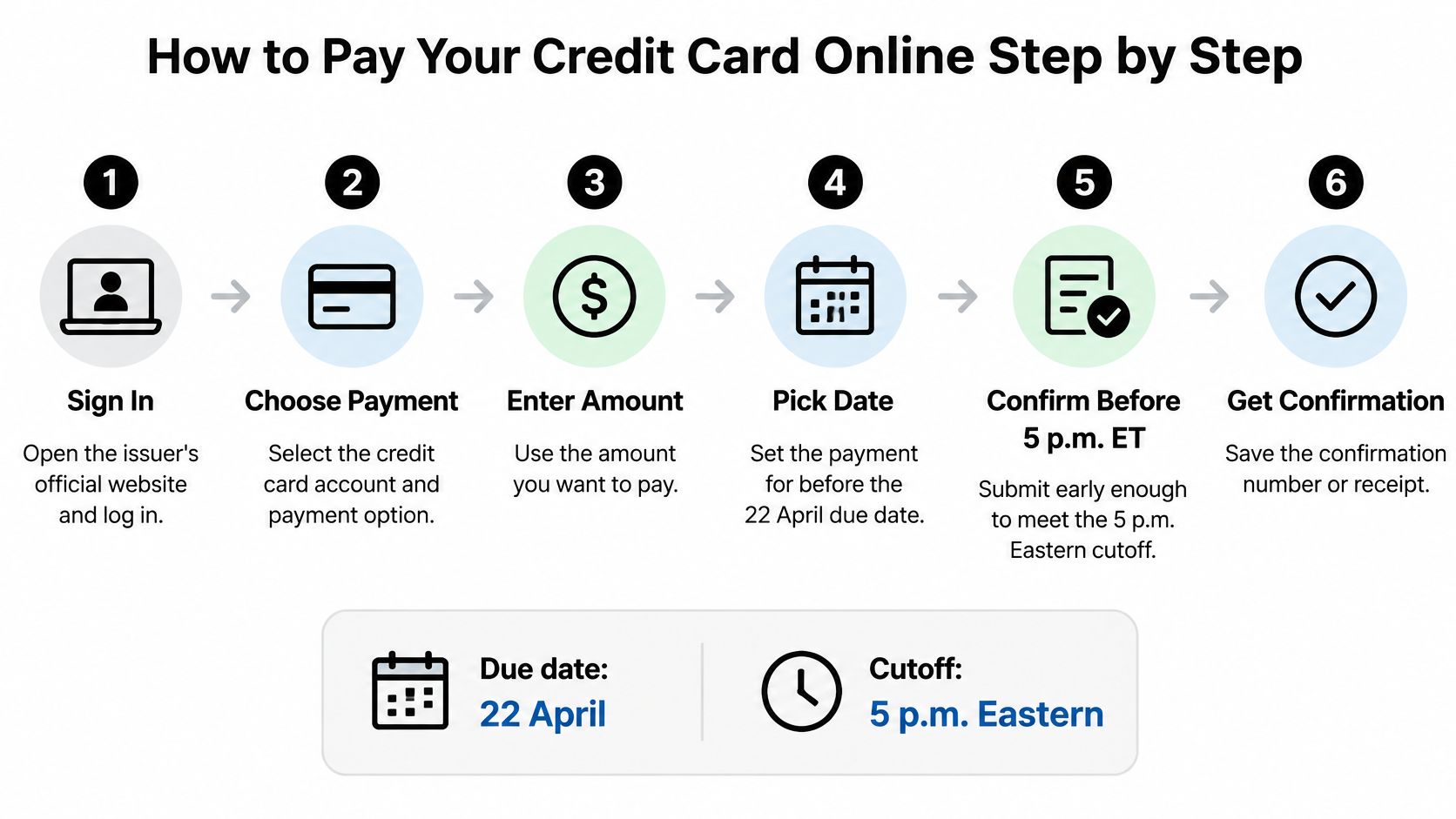
The Six Steps
- Sign in directly. Type the issuer's address or open its official app instead of following an email or text link. That single habit removes most fake login pages from the process.
- Select the correct card. Households often hold two cards from one issuer under one login. Match the last four digits on screen to the statement before entering any amount.
- Read the three numbers. Check the minimum due, statement balance, and due date, then decide which amount this payment covers. Don't let a preselected radio button make that decision.
- Confirm the funding account. Verify the linked checking account by its last four digits and make sure the balance covers the payment. A payment drawn on a near-empty account can be returned after it first appears to succeed.
- Pick the date with margin. For a payment due 22 April, submit on the 20th, not at 4:55 p.m. on the 22nd. A bank verification delay or a time zone mix-up can push a last-minute payment past the cutoff.
- Save the confirmation. Capture the confirmation number, amount, timestamp, and funding account as a screenshot or PDF. That record is the evidence if a fee appears later.
Why the Cutoff Decides the Date
A payment is generally credited as of the date the issuer receives it, but the issuer may impose reasonable requirements such as a cutoff time, and the Office of the Comptroller of the Currency guidance on credit card payments gives the example of a payment submitted at 6 p.m. against a 5 p.m. Eastern Time requirement being treated as received the following business day. The calendar date on the phone isn't the deciding factor. The issuer's clock is.
A successful submission ends with a reference number and a status of pending or scheduled. Anything less, such as a spinning page or a blank screen, should be treated as not submitted until the account history proves otherwise.
That pending status is normal, not a failure. It means the instruction exists. Whether the money arrived is a separate question, answered in the account activity over the next business day or two.
Confirming Your Payment Actually Posted
Submitting isn't paying. That assumption causes most avoidable late fees, because a confirmation screen only proves an instruction was accepted, not that funds moved and stayed moved.
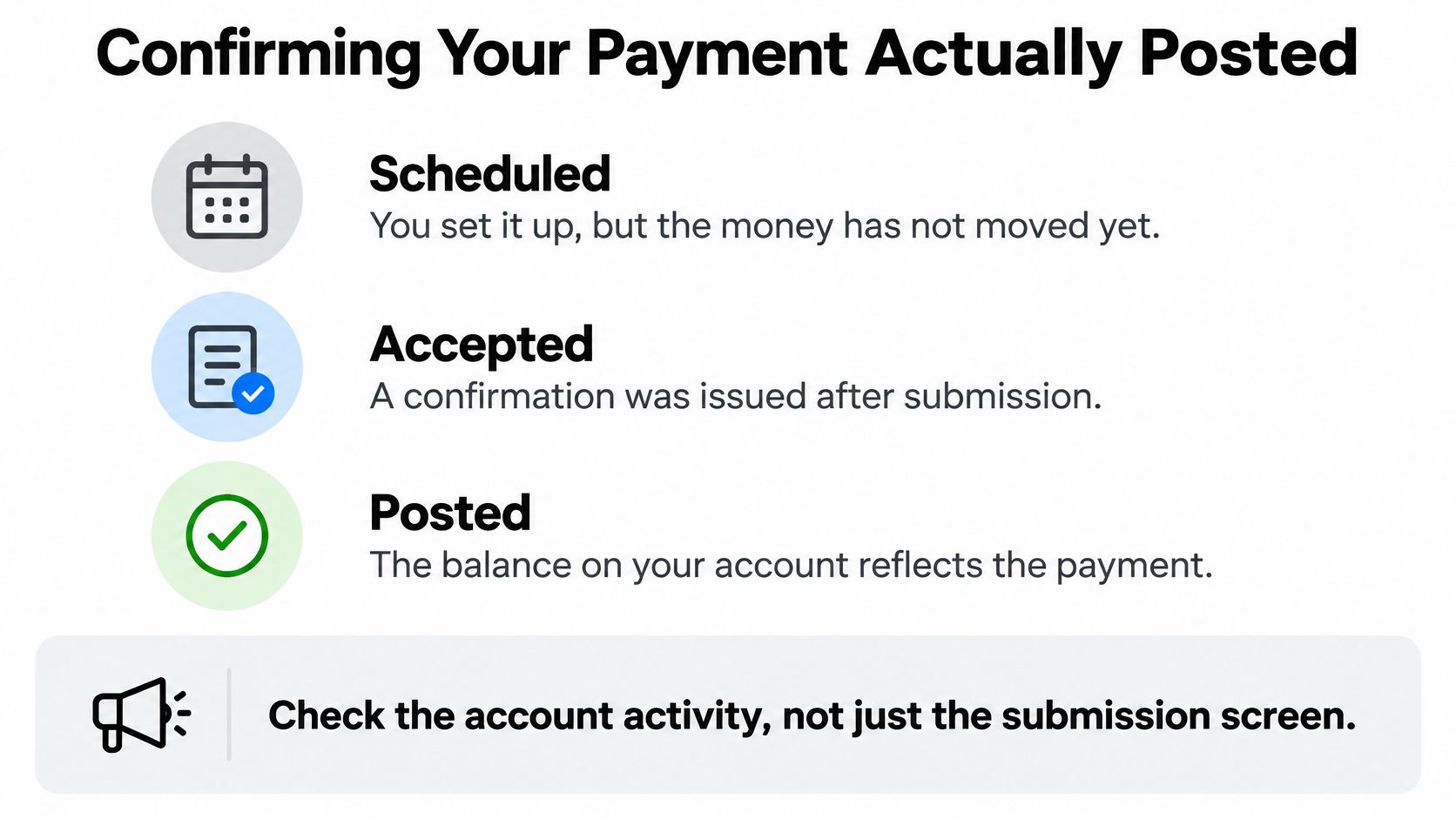
Three States, Three Different Meanings
- Scheduled: The payment is set up for a future date and no money has moved.
- Accepted: The issuer issued a confirmation after submission.
- Posted: The balance on the account reflects the payment.
The distinction matters at scale. Nearly half of U.S. credit-card adopters carried an unpaid balance during the past year, while the median balance among revolvers was $2,500 in 2025, according to the Federal Reserve Bank of Atlanta 2025 Survey and Diary of Consumer Payment Choice report. On a balance that size, one reversed payment can mean a fee, penalty APR exposure, and a messy statement.
Build a proof of payment record for every submission: confirmation number, timestamp with time zone, funding account last four digits, expected posting date, and a balance check two business days later. Note that available credit may rise before the posted balance falls, so compare both before deciding a second payment is needed. Sending a duplicate out of anxiety creates its own problem.
Friday evening, weekend, and bank holiday submissions are usually credited the next business day. Treat the last business day before the weekend as the effective deadline. If a bank reverses a payment after posting, the reversal shows as a separate line in account history, and that's where any fee investigation should start.
Payment problems, causes and fixes
| Symptom | Likely cause | Fix |
|---|---|---|
| Payment pending near the due date | Submitted after the issuer's cutoff or bank still verifying | Call the issuer before the due time with the confirmation number |
| Balance unchanged after two business days | Payment scheduled for a future date or not yet posted | Check the scheduled date and posted status in the account history |
| Payment rejected by the bank | Insufficient funds or incorrect account details | Fund the account first, then re-enter the account and resubmit |
| Late fee despite paying | Payment received after the cutoff, or the timestamp is missing | Ask the issuer to review, using your saved timestamp as proof |
| Duplicate charge from the bank | Same payment submitted twice | Cancel the duplicate through the bank or issuer before it posts |
| Payment applied to the wrong card | Wrong account selected at submission | Contact the issuer to correct the allocation and keep the record |
Any payment made within three days of the due date deserves a next-business-day check. That's the whole habit, and it catches silent failures while there's still time to fix them.
Protecting Yourself From Payment Scams
A text arrives at 6:40 p.m.: your card will be suspended unless you pay through the link in the message. The page opens in the issuer's colors, the form asks for card number, expiry and CVV, and a countdown sits above the submit button. That countdown is the tell. Real issuers set due dates and cutoffs. They don't run payment emergencies by text.

Exposure is widespread, not rare. Consumers across 17 markets reported that 52% had previously fallen for a scam, and 16% had done so more than once, in the Visa report on consumer security measures in digital payments. Stronger authentication helps, but fraudsters work around it with low-value transactions and exemptions.
Triage Before Paying
Treat these signals as a stop sign, not a prompt to hurry.
- Unsolicited contact: A text, email, or call demanding card payment to avoid suspension.
- Mismatched page: A login screen whose address doesn't match the issuer's name.
- Odd payment method: A request to pay by gift card or transfer money to a new "safe" account.
- Pressure to stay on the line: A caller who won't allow a callback to the number on the card.
Phone-based versions of these scripts are common, and the guidance on how to stop fake credit card calls from Gini Help is worth reviewing before the next unknown number rings. The safe response is always the same. Hang up, open the issuer app directly, and check whether anything is due.
The Verification Workflow
Open the issuer app or type the official domain manually. Check that the address begins with https, which the Federal Trade Commission guidance on secure online payment explains means information is encrypted while being transmitted, while noting that encryption alone doesn't prove a merchant is legitimate. Verify the payee name and account before sending money, enable transaction alerts and multifactor authentication, and never enter card details on a page reached from a payment link.
A payment has three states: scheduled, accepted, posted. A scam page can fake the first two. Only the posted transaction in the issuer account proves the third, so log back in and check that line before treating the debt as paid.
Sorting rule: An unauthorized charge, a mistaken payment, a merchant dispute, and an authorized transfer to a scammer are four different problems with four different recovery paths. Naming the right one at the first call saves weeks.
If Something Goes Wrong
For unauthorized use, federal rules generally limit a cardholder's liability, and many issuers waive the disputed charges. Report the charge to the issuer as soon as it appears. Speed matters more than perfect paperwork at this stage.
Merchant problems follow a different track. The Federal Trade Commission guidance on online shopping disputes says consumers may dispute charges for merchandise that was never received, was defective, or was billed twice, and should send a written dispute that reaches the issuer within 60 days of the statement mailing date showing the error. Say a statement mailed 5 June shows a $120 charge for goods that never arrived. The written notice must land within that 60-day window, so keep the order confirmation and delivery records ready.
If credentials or payment details were disclosed to a scammer, contact the issuer immediately, change the password from a clean device, and ask about replacing the card number. Waiting to see whether charges appear gives the other side a head start.
Set Up Autopay Without Overpaying
Autopay works best for a predictable cycle, a similar amount each month and a checking account that reliably covers it. Set up carelessly, it either underpays and leaves interest running or overdraws the funding account.
Setup in Four Moves
- Choose the amount. Select the full statement balance when cash flow allows, or a fixed amount that always clears the minimum.
- Set the date early. For a 22 April due date, schedule autopay for 18 or 19 April, and readers unsure how issuers set that date can review the credit card payment due date rules before locking it in.
- Turn on alerts. Enable due-date and low-balance alerts in the issuer app so a thin checking balance gets flagged before the debit runs.
- Verify the first run. Check the next statement to confirm the first autopay posted at the chosen amount. Autopay that never activated looks identical to autopay that worked, right up until the fee posts.
Where Extra Money Goes
Autopay handles the scheduled amount, but extra payments follow allocation rules. Under Regulation Z, issuers generally must apply amounts above the minimum first to the balance with the highest annual percentage rate, according to the federal rule on allocation of credit card payments. The exception involves deferred-interest promotions, where during the final two billing cycles before expiry, excess payments must generally be applied first to that deferred-interest balance.
Say a card carries $3,000 at 24% APR plus a $1,000 promotional balance ending in three months. Extra money should clear the promotion first so deferred interest never posts, then attack the 24% balance. Toya AI shows which debt to pay extra on and how much interest the user will save, and it recommends which payment to make next while showing the impact on time and interest.
Recalculate whenever an APR changes, a promotion nears expiry, or a new balance type appears. This week, set one autopay, confirm its date and amount, and write down the promotion end date for every balance carried. Those two actions prevent most autopay surprises.
Ready to stop guessing which card gets paid next? Toya AI centralizes balances, APRs, and due dates, recommends the next payment to make through the issuer's own portal, and shows exactly how that payment changes the debt-free date and total interest. Connect accounts with read-only access and get a clear, step-by-step payoff plan in minutes.
Ready to start your debt-free journey?
Toya AI builds a personalized payoff plan so you can see your debt-free date and save on interest.
Get Started Free