
Debt Payoff Calculator Snowball: Your Step-By-Step Guide

A reader may have four credit cards, an auto loan, and a student loan, yet still not know which payment should receive the next spare dollar. The statements arrive on different dates, minimums change, and the total balance feels too large to connect with a specific finish line. A debt payoff calculator snowball turns that uncertainty into a schedule, showing which balance receives extra money, when each debt may disappear, and what the plan costs under its assumptions.
The calculator isn't a promise or a replacement for current account statements. It's a working model. The useful habit is to read the model closely, test it against changing rates and minimums, and turn each result into a real payment decision.
Table of Contents
- What a Debt Payoff Calculator Snowball Actually Does
- Gathering Your Balances, APRs, and Minimums
- Ordering Debts and Entering the Extra Payment
- Reading the Payoff Schedule and Key Outputs
- Comparing Snowball Against Avalanche Numbers
- Updating the Calculator When Life Changes
- Your One-Page Action Plan to Start Tonight
What a Debt Payoff Calculator Snowball Actually Does
A snowball calculator is a forward-looking simulator, not a ledger of past transactions. It takes a list of debts, ranks them by balance from smallest to largest, and projects how payments move from one target to the next. The schedule can show when the first loan closes, when its payment becomes available for the next debt, and when the final balance reaches zero.
The method follows a simple sequence. Minimum payments continue on every debt except the current target. The smallest balance receives its required payment plus the borrower's extra budget. After that balance is cleared, the entire payment rolls into the next-smallest debt.
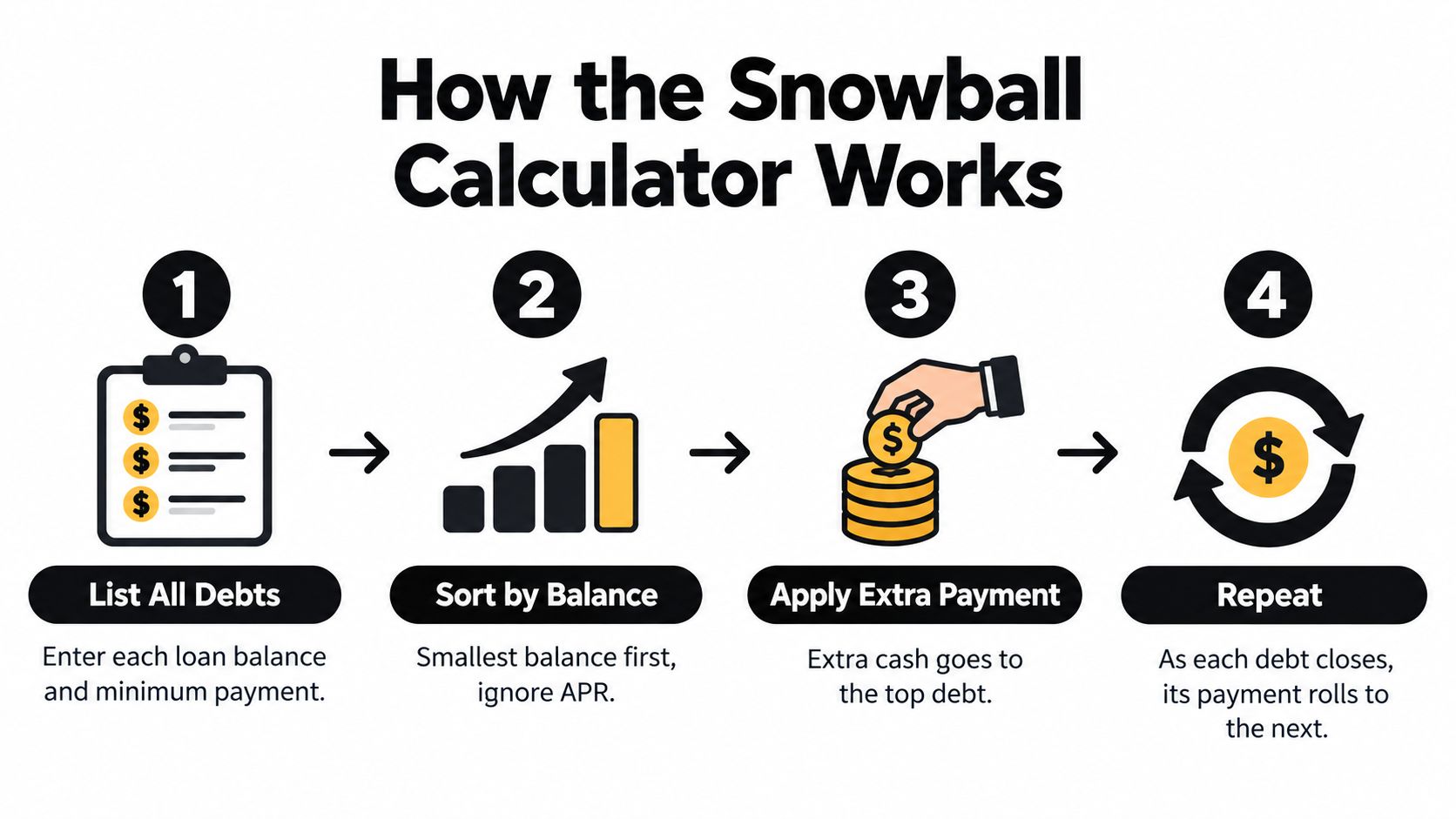
The inputs that shape the forecast
A reliable projection needs four fields for every debt:
- Current balance, the amount owed now.
- APR, which determines how interest accrues.
- Monthly minimum, the required payment under the current account terms.
- Extra payment, the additional amount available for the top-ranked debt.
A reader with four cards and a car loan might expect the finish line to sit somewhere in the distant future. After entering accurate figures and a sustainable extra payment, the schedule may show a specific month, such as month 27, rather than an indistinct year far ahead. That date is useful because it creates a checkpoint, but it remains dependent on payments posting as modeled and balances not growing again.
For a quick starting point, readers can use the loan payoff calculator to test a repayment path. A separate pay-off debt calculator guide can help organize the figures before the schedule is interpreted.
Practical rule: The calculator's value comes from exposing the next payment decision, not from producing a decorative debt-free date.
Gathering Your Balances, APRs, and Minimums
The quality of a snowball forecast depends on the figures entered before the first calculation. A reader should collect the most recent statement for every credit card, personal loan, auto loan, and student loan, then record the account details in one place. Old statements can contain outdated balances, promotional rates, or minimums that no longer apply.
Build the debt list from current statements
Four fields belong beside each debt:
- Current balance, copied from the latest statement or lender dashboard.
- Interest rate or APR, including whether the rate is promotional or variable.
- Minimum payment, using the amount currently required.
- Due date, so the model can become a payment calendar rather than a theoretical exercise.
Exact figures matter. A rate displayed as 24.99% shouldn't automatically be treated as 25% when the balance is expected to remain outstanding for a long period. Small input differences can alter the projected schedule, especially for balances that take many payment cycles to retire. The calculator should also reflect whether a minimum payment is fixed or likely to change.
The following structure gives a reader a clean worksheet before opening a tool.
| Debt Name | Balance | APR | Minimum Payment |
|---|---|---|---|
| Store card | $1,200 | 24.99% | $35 |
| Personal loan | $3,400 | 12.50% | $100 |
| Auto loan | $6,800 | 8.25% | $215 |
These figures are a sample format for organizing statements, not a forecast of the payoff result. The reader should replace every entry with current account data.
Check the assumptions before calculating
Credit card minimums may vary with balances and account terms. A calculator resource such as Vertex42's debt reduction calculator guidance specifically cautions that minimum payments can change and that a worksheet may need updating periodically. That warning matters because a static input can make a plan look more certain than the account is.
Record fees, rate-reset dates, and any promotional expiration visible on the statement. If an account has already charged a new fee or posted a payment that hasn't cleared, the balance should be refreshed before the baseline schedule is saved.
Ordering Debts and Entering the Extra Payment
Snowball ordering uses balance size only. APR and minimum payment still matter for the interest calculation and monthly cash requirement, but they don't decide which debt comes first.
Consider this mixed portfolio:
| Snowball Position | Debt | Balance |
|---|---|---|
| 1 | Store card | $1,200 |
| 2 | Credit card | $3,400 |
| 3 | Auto loan | $6,800 |
| 4 | Student loan | $11,500 |
The store card is the first target even if the credit card carries a higher APR. The auto loan remains third because its balance is larger than the credit card's balance, and the student loan stays last. This ordering creates an early completion point, which can make the plan easier to follow for a borrower who struggles to maintain a long repayment routine.
Apply the budget in one focused amount
Suppose the borrower can afford an extra $300 each month beyond required minimums. The calculator should receive that amount as the extra-payment field for debt number one. Every other debt receives only its minimum until the first target closes.
The calculation then changes at each payoff event. Once the $1,200 store card reaches zero, its former minimum joins the $300 extra amount and moves to the $3,400 credit card. When that account closes, the payment grows again for the auto loan. The borrower isn't paying more than the planned monthly budget unless the budget itself changes. The same total payment is concentrated on fewer remaining accounts.
A zero-extra scenario can serve as a useful baseline, but it shouldn't be mistaken for an efficient plan. Adding a realistic extra amount can move the finish line substantially and reduce interest, though the exact result depends on balances, APRs, minimums, and account rules. Readers who want to understand how additional money affects principal can review extra principal payment strategies.

A practical consumer example from National Debtline's snowball explanation uses four debts totaling £9,290, with £235 in minimum payments and £65 in extra budget. The £65 joins a £35 catalogue minimum, producing a £100 focused payment for the smallest debt before the freed payment moves to the overdraft. The arithmetic demonstrates the rule clearly: extra money goes to one target, while the other accounts remain current through their minimums.
Reading the Payoff Schedule and Key Outputs
A payoff schedule becomes useful when the reader follows it row by row rather than looking only at the final date. Common columns include the month, scheduled payment, interest charged, remaining balance for each debt, and cumulative totals. Each row represents the interaction between accrued interest, required payments, the focused extra amount, and any payment rolled over from a completed account.
The first target might disappear around month four in a schedule built around a $1,200 credit card, a $35 minimum, and $215 in extra money. At that point, the payment directed to the next target includes the freed $35 and the $215 extra amount, subject to the calculator's treatment of interest and timing.

Find the moments that change the plan
The first debt disappearance is more than a line in a spreadsheet. It marks the first visible completion point and confirms that the rollover mechanism is working. A reader should record the date, verify that the lender shows a zero balance, and redirect the former payment according to the schedule.
Two headline outputs deserve separate attention:
- Debt-free date, the projected month when the final balance reaches zero.
- Total interest, the sum of the interest charged across the schedule.
Both should be compared with a minimum-payment-only scenario. The comparison shows what the extra payment is buying in time and cost. It also reveals whether the plan depends on an extra amount that the household can't maintain.
A schedule deserves closer review if interest exceeds a required payment, if the balance grows instead of shrinking, or if the tool displays a negative-amortization warning. Those signs can indicate that the minimum payment, rate, or account type has been entered incorrectly. They can also reveal that the proposed payment isn't sufficient under the current terms.
The schedule becomes much easier to trust when every row has a clear explanation. Interest is added, the payment is applied, the balance changes, and the target advances. The reader's task is to confirm that the model reflects the lender's actual rules.
Comparing Snowball Against Avalanche Numbers
Snowball and avalanche aren't competing beliefs. They're two ordering rules applied to the same repayment budget. Snowball ranks debts from smallest balance to largest, while avalanche ranks them from highest APR to lowest.
A fair comparison uses identical balances, APRs, minimums, and extra payment. The reader changes only the ordering method, reruns the schedule, and records the debt-free date and total interest. The first target will also change, which helps clarify whether the borrower values an early balance closure or immediate interest minimization.
| Method | Order Rule | Months to Debt-Free | Total Interest Paid | First Debt Paid Off |
|---|---|---|---|---|
| Snowball | Smallest balance first | Calculator output | Calculator output | Smallest balance |
| Avalanche | Highest APR first | Calculator output | Calculator output | Highest APR debt |
The trade-off is supported by rigorous analysis. A 2023 analysis based on the 2016 Survey of Consumer Finances estimated that snowball repayment carried an average interest-cost premium of 1.8% to 4.3% compared with an interest-minimizing order, while estimated national excess interest transfer ranged from $46.2 billion to $53.9 billion (Socio-Economic Planning Sciences analysis). Those figures don't mean every borrower will face the same difference, but they do establish why the calculator should display the extra dollars and months rather than presenting snowball as cost-free.
Behavioral evidence adds an important qualification. An empirical study of thousands of households found repayment behavior consistent with a balance-matching heuristic, where payments were spread in proportion to balances instead of optimized by APR, and that pattern remained persistent within individuals over time (American Economic Review study). Early completion points can therefore matter when a borrower risks abandoning a mathematically cheaper plan.
A practical decision rule is straightforward. Choose snowball when motivation and follow-through are the main obstacles. Choose avalanche when reducing every avoidable interest charge is the priority and the borrower can stay committed without frequent payoff milestones. Readers facing severe collection pressure should also understand broader options, including information about filing bankruptcy for wage garnishment, before selecting a repayment order. A side-by-side snowball versus avalanche calculator makes the choice concrete.
Updating the Calculator When Life Changes
A debt forecast becomes outdated when the account terms or household budget changes. The solution isn't to discard the original schedule. Save the baseline, duplicate the file, add the current date to the new filename, and update only the fields that changed.
Use a clear rerun checklist
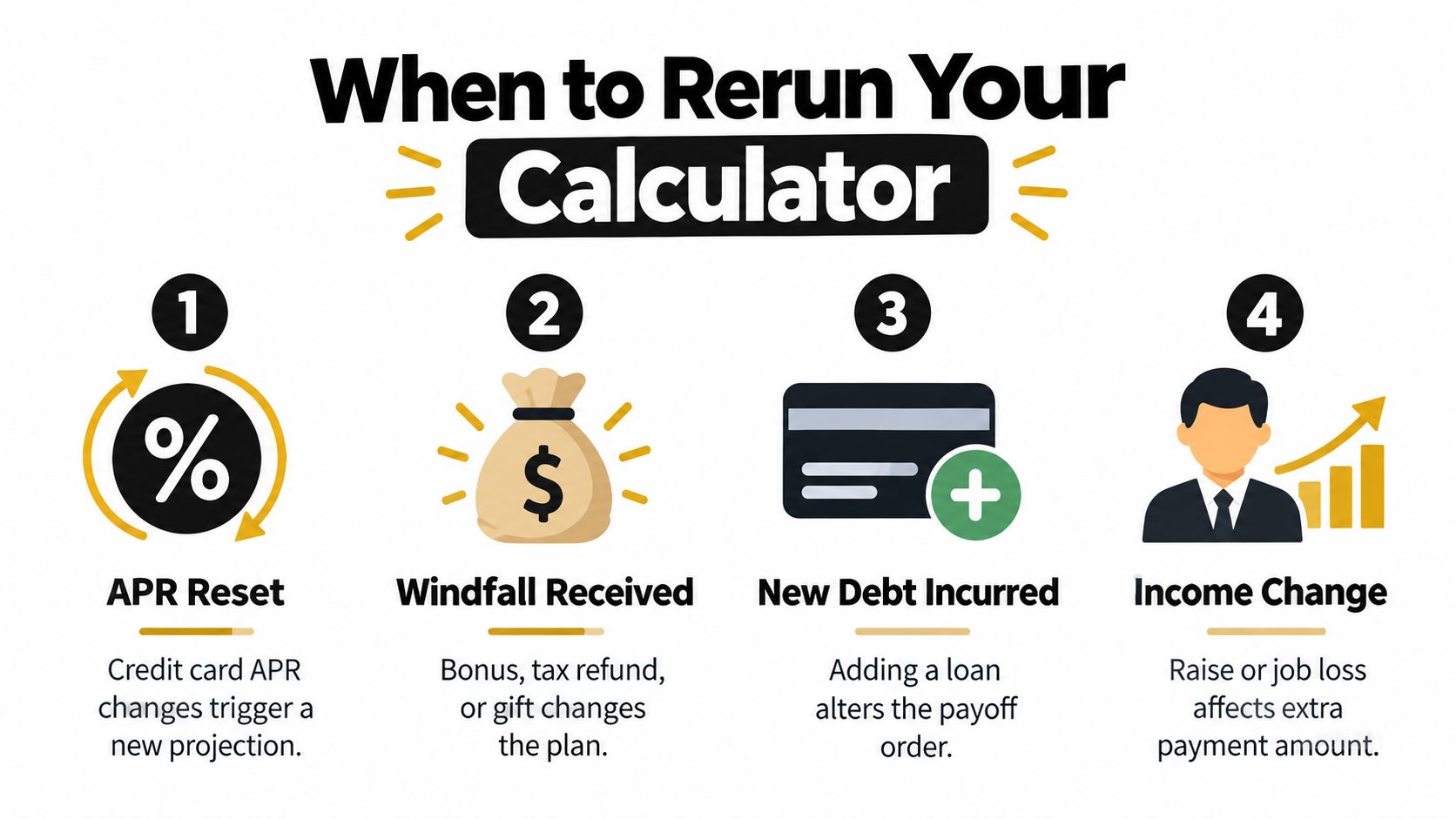
- APR reset: Replace the old rate with the new APR and check whether interest has already posted.
- Minimum-payment change: Enter the new required minimum, especially after a balance crosses an issuer threshold.
- Promotional rate expiry: Update the APR and the date on which the regular rate begins.
- New balance: Add the account with its balance, APR, minimum, and due date, then resort the snowball order.
- Windfall: Increase the extra-payment field only if the money is available.
- Missed month: Replace the affected balance and payment assumptions, then note any fees or interest added.
A missed payment can also change the APR after a late-payment event. A new charge can move an account higher in the balance order. A temporary income reduction may require a smaller extra payment, while a sustained raise may support a larger one.
Compare the revised debt-free date and total interest with the saved baseline. A longer horizon is information about the new conditions, not evidence that the borrower has failed. If the date moves outward, the next action might be trimming one discretionary expense and adding that amount to the extra-payment field.
A monthly 10-minute review can keep the plan realistic. Confirm posted payments, refresh balances, check notices for rate or minimum changes, and save the revised schedule. This routine turns a static worksheet into an adaptive plan that can respond before a small change becomes a major surprise.
Your One-Page Action Plan to Start Tonight
A single focused session can turn scattered statements into a working repayment routine. The reader doesn't need a perfect budget or a flawless forecast to begin. The first goal is accurate visibility and one clearly identified target.
- Collect the statements. Record every balance, APR, minimum payment, and due date in one worksheet. Include cards, personal loans, auto loans, and student loans.
- Sort the list. Arrange the debts from smallest balance to largest, then label the first target. Keep APR visible even though it doesn't determine snowball order.
- Enter the plan. Add each balance, APR, minimum, and realistic extra payment to a debt payoff calculator snowball. Save the baseline debt-free date and total interest as a screenshot or dated file.
- Schedule the behavior. Make minimums on every account, direct the extra amount to the first target, and check once a week that the payment posted and the balance fell.
- Rerun when facts change. Update the file after a minimum shifts, a rate changes, a new balance appears, a payment is missed, or extra money becomes available.
The worksheet is a snapshot, not a contract. Its purpose is to show the next action and make progress visible, while regular updates keep the forecast connected to real account activity.
A reader who wants account-level tracking can evaluate Toya AI, which centralizes balances, APRs, utilization, and due dates in a dashboard and models how payment changes affect the debt-free date, monthly interest, and total cost. Visit Toya AI to start with a calculator or explore an adaptive payoff plan that updates as financial circumstances change.
Ready to start your debt-free journey?
Toya AI builds a personalized payoff plan so you can see your debt-free date and save on interest.
Get Started Free